List of Most Popular Games on Facebook in 2013

In addition to social media, Facebook also has gaming features that can make people addicted. Not surprisingly, the creation of Mark Zuckerberg has finally released the list of the most popular games throughout the year 2013.

Games included in this list are selected based on an assessment of the associated implementation users on Facebook and a growing number of gamers and overall game quality. In addition, for the category of favorite staff consists of some of the popular games on Facebook's office.

Criminal Case, Most Popular Games on Facebook in 2013

In the list, the game earned a "Game of the Year 2013" is a Criminal Case, which utilizes Facebook Open Graph API. The following is a complete list of the most popular names that exist on Facebook:

Latest Game Category :

1. Bake Shop Drop by Broken Bulb Studios [Match-3 game]
2. Farm Heroes Saga by King [Match-3 game]
3. Heart of Vegas by Product Madness/Aristocrat [Slots game]
4. Hit It Rich Casino Slots by Zynga [Slots game]
5. Jelly Splash by Wooga [Match-3 game]
6. Kitchen Scramble by Disney Interactive [Strategy/time management game]
7. Monster Legends by Social Point [Monster battles game]
8. The Smurfs & Co.: Spellbound by Ubisoft [Strategy/village building game]
9. Soldiers Inc. by Plarium [RTS game]
10. Solitaire Tales by Qublix [Cards game]
11. Thunder Run War of Clans by SpinPunch Games [RTS game]
12. Vikings Gone Wild by EveryDayiPlay [RTS game]

Facebook Staff Favorites Category :

1. DoubleU Casino by AFewGoodSoft [Cards game]
2. Game of Thrones Ascent by Disruptor Beam [RPG/simulation game]
3. King's Bounty: Legions by Nival [Turn-based strategy game]
4. Panda Jam by SGN [Matching game]
5. Wartune by 7Road/Proficient City [MMORPG]
6. War Commander by Kixeye [RTS game]

Next game that has the title of "Hall of Fame" or games that have been present before 2013, but remained popular in 2013 are as follows:

1. Candy Crush Saga by King [Match-3 game]
2. DoubleDown Casino by DoubleDown Interactive/IGT [Cards game]
3. FarmVille 2 by Zynga [Farm simulation game]
4. Slotomania by Playtika/Caesar’s Interactive [Slots game]

Facebook itself has started a trend showing games for users on the site since 2012. Now this year the list of games on the site have been included and users who have not tried these games can use these lists to spend free time.

Swarm.fm Apps Sync Facebook and Sportify for Your Fave Music

Swarm.fm is a unique application that sync Facebook and Sportify for you to search favorite music recommendations.

Swarm.fm is a new app for music streaming service Spotify. The app won first prize at Spotify’s Music Apps Hack Weekend back in February, and has now been integrated into the Spotify software. Swarm.fm is the brain-child of Peter Watts, the same developer responsible for +Music, a music extension for Facebook. +Music was the primary method of listening to music on Facebook, before the social networking site partnered with other services, including Spotify.

Speaking at the hacking event earlier this year, Watts explained:

“Swarm augments your music collection with activity from your friends (liking bands, listening, posting songs) and activity from artists you like (new releases, status updates), to keep you up to date with your ‘music universe.’ It also find similarities between friends and can generate playlists based on artists, interests and brands you have in common.”

Swarm.fm Apps Sync Facebook and Sportify for Your Fave Music

Once installed, Swarm.fm runs inside Spotify. When on screen, you can open up information about any of the artists in your Spotify library. Available information includes which individual tracks you have, the artist’s discography, and which of their tracks are available to stream through Spotify. You can also read a biography, and connect with Facebook to find out which of your friends have been listening to the same artist.

So far, so good. One of Swarm.fm’s reigning features, however, is its ability to direct you to new music based on what you’re already listening. It does this in two different ways: by genre, and by similar artists.

Swarm.fm Apps Sync Facebook and Sportify for Your Fave Music

When you view an artist’s biography, you can see which genres they are “tagged” with. Clicking on these tags takes you to a list of artists who share the same tag. There, you can view artists by similarity, popularity, and ‘trending’ (i.e. emerging artists). You can also view other artists in your collection that match this tag.

Clicking on the “Similar” tab in the artist’s profile page brings up a list of similar artists that you might enjoy.

Swarm.fm Apps Sync Facebook and Sportify for Your Fave Music

Once you’ve connected with Facebook friends, you can find out what they’re listening to through Swarm.fm, even if they don’t have a Spotify or Swarm account themselves. And if you connect to a friend whose music taste turns out to be less than palatable, simply mute them, without having to disconnect.

That’s already quite a lot of features, but Swarm.fm doesn’t stop there. You can also view brand new releases, filtering the results to only include new releases from artists already in your Spotify library, or the most popular. In addition to finding new music, you can use the app to manage your current library. Search for music or artists, display artists of certain genres, or display artists from a certain year.

Swarm.fm Apps Sync Facebook and Sportify for Your Fave Music

Swarm.fm provides a comprehensive service that goes above and beyond what most music managers give. If you’re a regular Spotify user and want to give the music streaming service extra functionality, Swarm.fm is a great way to bring everything together and view your music library, friends’ soundtracks, and new recommendations all in one place.

Find out more about Swarm.fm by viewing the video below :


Make Schedule for Your Facebook Status

Are you a busy person but do not want to miss making status? Can you use a little Facebook automation. The step here.

Many users are cheered up with this feature because Facebook's EdgeRank algorithm made ​​using third-party tools like HootSuite or SocialOomph for scheduling your posts desirable less than manually posting.

Now let's learn more about the advantages of using Facebook scheduled posts. First we will tell you the steps to schedule your status and edit them.

Make Schedule for Your Facebook Status

#1: How to Schedule Your Posts Scheduling is easy—just follow these steps:
  • Write your post as you normally would. You can attach photos, add links, add YouTube videos, add tags to other pages and events or just include regular text.Make Schedule for Your Facebook Status
  • Type your post as you would normally.
  • In the lower-left corner of your post, click on the clock symbol as shown in the screenshot above. You can now add the year, month, day and time you want the post to go out.
    Make Schedule for Your Facebook Status
    Add the date and time you want your post go out.
Notice that you can also backdate your posts to supplement your Timeline if you wish (more on that later).
You can schedule your post up to 6 months in the future (more months are shown, but if you select more than 6 months out, Facebook won’t accept it). You can schedule the minutes at 00-, 10-, 20-, 30-, 40- or 50-minute marks of the hour. So if you need a post to go out specifically at 2:15 pm, you cannot set it.
  • You can also add language and location targeting in your scheduled posts, just like you can in your regular posts. Just click on the Public icon and make the necessary adjustments.
  • Once you have everything set, just click the blue Schedule button. VoilĂ ! Now just remember to circle back to your posts later after the scheduled time to watch for follow-up comments!

#2: How to Find and Edit Your Scheduled Posts

To see what you have scheduled and make any changes, just go to your activity log by accessing the admin panel at the top of your page (if you don’t see the admin panel, click the red admin panel button in the upper-right corner), then click Edit Page, and Activity Log. You then see all of your scheduled posts.


Make Schedule for Your Facebook Status
Use the activity log to find your scheduled posts.
Make Schedule for Your Facebook Status
View your scheduled posts.
If you need to edit your scheduled post, the only thing you can change from here is the time, unfortunately. To edit the text, you must cancel the post and redo your scheduling. To cancel or change the time, mouse over the upper-right corner of the post in the activity log.

Make Schedule for Your Facebook Status
You can only change the time or cancel the post and start over.

#3: You Can’t Schedule Everything

You can schedule links, photos, status updates and videos (although I found scheduling a video to be a bit buggy). You can also schedule a YouTube video link, which will attach as it normally does in your posts.

Make Schedule for Your Facebook Status
You can schedule a photo.
You can’t schedule some of the other types of posts as you can normally do from the publisher, such as photo albums, posting of events, questions, offers and milestones.

#4: You Can Backdate Your Posts

You can schedule things in the past. I’m not sure why you would want to use the backdating feature other than to fill out your Timeline a bit. But if you have a significant event that you want to post about in the past, I recommend a milestone post instead.

The interesting thing about backdating is that the post does go out into people’s news feed immediately and then is shown at the appropriate place on your Timeline.

Make Schedule for Your Facebook Status
The backdated post goes out immediately into the news feed with a note about when it was added into the Timeline.

#5: Scheduled Posts Won’t be Automatically Tweeted

If you have linked your Twitter account to your Facebook page by setting up www.Facebook.com/Twitter so that everything you post on Facebook gets tweeted (yes, we know that it’s not always a great idea but sometimes it isn’t terrible), be aware that your scheduled posts won’t go out to Twitter.

So if you rely on your Facebook page to supplement your tweets and you move to more scheduled posts, you will have to schedule your tweets with a different tool.

#6: Scheduling Posts Can Bring about More Engagement

What can you expect when you schedule posts? It depends on your baseline right now with your Facebook page—how often you are posting, how engaged your audience is, what you are posting and other factors.
One thing that scheduling can do for you is allow you to post more regularly and increase your posting without spending all day on your Facebook page.

Randi Thompson of How to Market Your Horse Business (and an active member of our Social Networking Clubs) tried an experiment where she upped the number of posts by using scheduled posts on two of her pages.

On her How to Market Your Horse Business page, she went from posting 3 times a day to posting every 3 hours and 5 times a day. Then she had another page, Horse and Rider Awareness, where she was not posting regularly at all. She tried scheduling 3 quality posts per day. Here are her results over a 5-day period.

Make Schedule for Your Facebook Status
Using Scheduled posts to increase post frequency helped increase engagement.
Now of course this is not a comprehensive study. And this could be done without scheduling posts. But the point is that scheduled posts can make things easier for you so you can batch your work, know that things are being posted at the times you want and you can get on with other parts of your business. I encourage you to try some experiments with scheduled posts on your page and see how things work for you.

And again, make sure you circle back to these posts to follow up on comments!

#7: Scheduled Posts are not Identified or “Punished” in Facebook

When you post from a different scheduling tool such as HootSuite or BufferApp, people can see that you’re posting through a different tool. But Facebook’s scheduled posts are seamless.
Make Schedule for Your Facebook Status
The posting tool appears under the post.
Using a different tool to post to Facebook is not all bad. Sometimes it’s much better to save yourself a little time and get the post out with the tool you’re using rather than not post at all.

But Facebook has been known to show posts using third-party tools a little less in the news feed or collapse them. As of this writing, I believe third-party tools are faring well in Facebook. But we all know how Facebook changes.

#8: Scheduled Posts May be Coming to Personal Profiles

The option does appear to schedule a Facebook post on personal profiles, which may be a good thing for people who are using their personal profiles to talk about business. But as of this writing, I could not schedule anything into the future, only for today or in the past.

Not everyone will see big changes by scheduling posts. You still have to deliver engaging Facebook content. But what scheduled posts can do is free up some of your time by allowing you to batch your social media posts into blocks and give you more time to focus on your business.

What are your thoughts? Have you been using scheduled posts? What results have you seen? Tell us in the comments section below!

Source

7 Enterprise Social Platforms Think Beyond Facebook

Want a "Facebook for the enterprise" to help improve collaboration? These 7 players show today's wide range of options for internal social networking.

7 Enterprise Social Platforms Think Beyond Facebook
  
In a recent story on internal social networking, experts discussed the potential of enterprise social networks to drive knowledge worker efficiency to new levels. They also noted that setting goals for internal social collaboration is more important than the platform used to enable the collaboration.

That is true, but choosing the platform is a pretty important task, too. Selecting the right platform has also become a more challenging task of late, as more providers are rolling out internal social networking platforms or adding social networking capabilities to existing enterprise applications. The latest large enterprise player to enter the fray is Oracle, which announced in October its Oracle Social Network.

We've highlighted a few of the options here. It's by no means a comprehensive list, but is instead intended to provide a place to start and a sense of the different types of platforms available and their capabilities. Most of the products are free for a basic edition and priced at a per-user/per-month basis for an enterprise edition.

In an upcoming story we will provide some recommendations for developing an evaluation shortlist, as well as tips for effectively gauging different solutions' value based on your organization's needs.

SAP StreamWork
SAP's buttoned-down StreamWork is a SaaS-based social networking tool built for business collaboration. The Enterprise Edition adds advanced security, automated provisioning, and the ability to integrate with legacy apps, including SAP software and Microsoft SharePoint.

Cisco Jabber
Leveraging Cisco's unified communications platform, Cisco Jabber is designed to make employees more productive no matter where they are or what device they use. The result of Cisco's 2008 acquisition of Jabber, the service enables users to access presence, instant messaging, voice, video, voice messaging, desktop sharing, and conferencing capabilities.

SocialCast
In May, VMware purchased SocialCast, a social networking platform that enables companies to integrate social tools and processes into enterprise applications. The free version of SocialCast offers such features as activity streams, a private message function, microblogging, and profiles. The premium version adds analytics, directory integration and user roles, among other features.

Jive Software
A social networking pioneer that launched an IPO this week, Jive is an extensible platform that enables third-party developers to integrate Jive's social networking capabilities using an SDK based on OpenSocial.

Yammer
Yammer is a free, flexible platform that enables anyone to easily set up a simple social networking platform. Upgrading to the Enterprise edition adds management, monitoring, security, and customization capabilities, and Yammer offers several pre-built integrations with widely used enterprise applications. These include Salesforce.com, Microsoft SharePoint, and NetSuite.

Salesforce.com Chatter
Salesforce.com was an early enterprise advocate for social networking, and its Chatter offering has evolved from a feature of the company's CRM offering to a stand-alone system that even non-Salesforce.com customers can implement. Chatter Free enables users to create profiles, post updates, follow coworkers, create groups, share files, and collaborate with colleagues in a private and secure environment, with Chatter Mobile and Chatter Desktop providing anywhere access. The Chatter Plus edition provides everything you get in Chatter Basic as well as tighter integration with CRM users and capabilities, as well as enhanced security and other controls. Chatter is also integrated into Salesforce.com analytics.

Neudesic Pulse
Neudesic Pulse enables real-time open sharing to foster innovation and make workers more productive and businesses more competitive. Microsoft partner Neudesic recently upgraded Pulse to enhance its integration with SharePoint, but Pulse goes beyond SharePoint to enable social collaboration on the applications that enterprises are already using, including CRM, so workers don't have to learn yet another application.

ShoutFlow: Another Social Network For Your Personal And Professional Life

SHOUTFLOW: ANOTHER SOCIAL NETWORK FOR YOUR PERSONAL AND PROFESSIONAL LIFE

A new app called ShoutFlow wants to create a non-intrusive social network by hooking you up with people that you haven’t met, but who share common interests and mutual friends.

Let the comparisons to 2 other social discovery tools we recently covered begin:

Converge pulls data from social networking sites to help you meet new people, romantic interests, and potential roommates.

Hyphos provides you with the closest group of friends you never knew you had – their platform allows you to find people around you based on interest and location.

ShoutFlow is a s*xy app, offering an attractive design and easy-to-use and familiar features, such as uploading pictures; suggesting favorite bands, books, and movies; providing status updates; and filling out a full profile. Hmm, that sounds a lot like Facebook.

On their site, Shoutflow says you can use it for networking professionally and personally. But if you already use LinkedIn and Facebook, I honestly don’t know why you would also use Shoutflow. While the app may be beautiful, it is entering a beyond-crowded marketplace. Perhaps their business model is based on a liquidity event or IPO? What do you think?

Create Your Own Social Networking Community Easily

The growth of Social Networking sites in India is immense. Creating your own social networking site is easier said than done; making it mobile compatible is even harder. There are plenty of tools and free scripts available for creating your own social networking community; sadly, none of these frameworks are tightly integrated with mobile platforms like Android, iPad, iPhone, tablets and so forth.

If you want to create your own social sharing site with apps for Android and iPhone, have a look at Boonex Mobile Apps. Boonex is superb mobile social networking software which allows you to create mobile specific applications for your social community. Mobile apps created with Boonex are closely integrated with Dolphin, which offers a unique platform for expanding your social network to targeted mobile users.


Two main Advantages

First and foremost, the reach of your social site increases as users can download your application from the respective app stores. Second, users will enjoy your mobile apps and need not necessarily use a computer to connect with their friends and followers.

Here is an example of a demo social site created with Boonex

Boonex works on the concept of plug and play, you don’t need coding or programming skills to build a mobile app in the first place. This is ideally suited for small businesses who have a low budget and want something out of the box, rather than spending a good amount of money on web developers and designers for developing their mobile applications.

So what exactly Boonex can do for you and what features will you get in the package? Well, Boonex has got you covered with the following features:
  • Member profiles and friend browsing.
  • Photo, Video and media uploads directly from the phone or desktop.
  • Photo uploads straight from the camera app.
  • Video, Music and multimedia browsing.
  • Connecting to third party sites that are powered by Dolphin.
  • Friend requests, timeline view and real time notifications.
  • GPS based location updates and search y location or keyword. based search.

Overall, Boonex is undoubtedly one of the best ways to create open source iPhone Apps and Android apps for social sites. Dolphin comes at Prime and Enterprise package plans which includes Dolphin smart community builder, along with mobile rebranding licenses, unity memberships and installation services. The Enterprise plan is geared towards creating a network of community sites while the Prime plan is ideally suited for single social platforms.

More articles: Creative Art Weird Tech Tourist Destination Smartphone Review Social Media News Photography Tips and Tricks Harga Spesifikasi Ponsel Jasa Foto Video Shooting Artikel Unik Kisah Misterius Tips Wedding Akidah Islam Berita Unik Blogging Tutorial

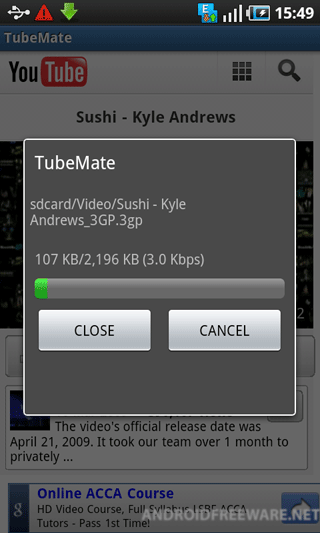
YouTube TubeMate

You can download the various quality of video, from 3gp to Full-HD

1) Run Application
1) Browse contents with "m.youtube.com"
2) Use "Menu" key to download video
: To download the file, you should browse the video review page)
3) Choose the quality of the video you want
: Support 4 types : 3GP(Lowest), MP4, HD, Full-HD(highest)
* Generally HD and Full-HD are not supported by smart phone.
4) Support background Download
: You can check it in "Notifications Bar"
5) Support continuing download
: If you want to stop to download, click the message in the notifications and it shows you the dialog.
Click 'CANCEL' to stop downloading. 
If you download the same file again, TubeMate continues downloading the rest of the contents
(file is appended)
6) Support progress/bitrate reports
7) Support youtube links from external Programs
: If you find a link to youtube in a tweet, Click it and you can find the "TubeMate" in the "Choose Dialog".


YouTube TubeMate Screenshots


Download YouTube TubeMate free for Your Android phone


Twitter for iPad: Sharing Content in Tweets

People are increasingly sharing different types of information on Twitter. For example, Tweets point to web pages, photos, videos, hashtags, people, check-ins, and more. Exploring Tweets is a great way to discover new and interesting information. And with devices of all shapes and sizes connecting to the Internet, we’re constantly looking for new ways to make this easier. To date, we’ve created applications for a variety of mobile phones, giving you instant access to Tweets and great content when you’re on the go.

Today we are bringing Tweets to a device that really lets content shine - the iPad.
Twitter for iPad takes advantage of the iPad’s fluid touch interface, letting you move lots of information around smoothly and quickly – without needing to open and close windows or click buttons. There are a few things we want to point out that make this app a really fast and fun way to read real-time content.


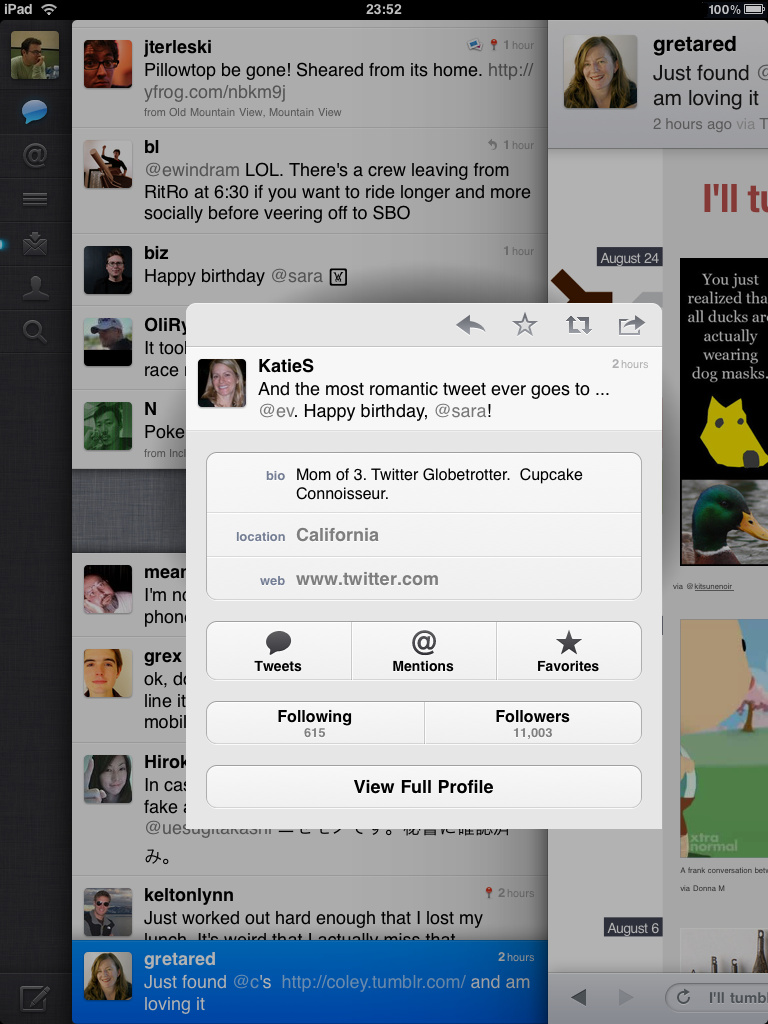
Panes: Tapping on a Tweet opens a pane to the right. Depending on the content in that Tweet, you’ll see a video or photo, or maybe a news story, or perhaps another Tweet. You can continue tapping on Tweets, opening new panes, and getting new content as long as you’d like to. And, it’s really easy to move between panes by swiping to the right or left.


Media: When you tap a video link or open a web page with an embedded video, you can play that video inline. And, let’s be honest, video is great but sometimes it can take some time to load. The panes in Twitter for iPad let you look through your timeline while a video is loading, and then you can just swipe back to the video when it’s ready to play. You can also pinch on a video to watch it fullscreen. Gestures: You can pinch on a Tweet to quickly view details about the author and to take actions on a Tweet, such as reply or retweet. Put two fingers together and pull down on a Tweet to peek at the replies, showing the entire conversation leading to that Tweet.
 
No need to login: You don’t even need to sign up to get started with Twitter for iPad. We’ve selected great Twitter accounts that you can see in various categories, such as Art & Design, Sports, and News. You can also search, view trends, and find breaking news. Sign up at any time to create your own timeline and start tweeting.

Twitter for iPad is available worldwide from the App Store. Try it out and let me, @, and @ know what you think.

Diaspora The Open Source Facebook Killer Coming Sept 15th

socialnetupdate.com

Facebook is without doubt, the biggest social network out there. It’s unrivaled by the likes of linkedin, myspace and bebo in this day and age and is easily the most visited site on the web. It seems like it’s too big to take down, but that’s not going to deter some students from New York University.

Daniel Grippi, Maxwell Salzberg, Raphael Sofaer, and Ilya Zhitomirskiy are the creators of Diaspora, the open-source social network that they are hoping will take down Facebook. They describe Diaspora as a “distributed network, where totally separate computers connect to each other directly, will let us connect without surrendering our privacy.”
diasporalaunch915 Diaspora The Open Source Facebook Killer Coming Sept 15th
The recently announced in a blog post that Diaspora is set to hit the web on September 15th.
“We have been coding. We have Diaspora working, we like it, and it will be open-sourced on September 15,”
So how is it different from Facebook? Well, the main difference is there will be a lot more privacy and you can control what gets shared with who and how much you want them to know about. All the information is stored on your machine, and not actually on a third party host or server. Your computer will be known as a “seed” and once it’s all set up, it will aggregate all of your information, like Facebook Profile, Tweets etc…. all in one place for you.
The main priority for the team is to make sure it’s as easy as possible for people to share only what they want and to maintain their privacy.
Diaspora has been completely funded by donations from individuals, and has managed to receive over $200,000 in funding to date, so some people must be interested in it.
We’ll see if it’s any good on Sept 15th anyway, and if you want to find out anything more about it, head over to join diaspora.

Tweets Without Twitter: Twitter Launches Fast Follow


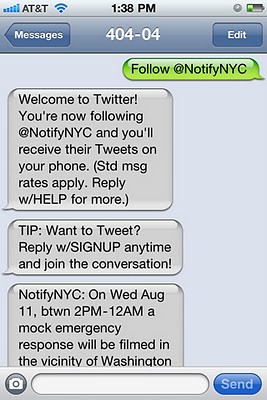
Yesterday, Twitter announced a new service called Fast Follow that allows anyone to receive tweets on their mobile phone without benefit of a Twitter account. You set up the service by sending ‘on [username]’ to 40404 in the US. You turn off the tweets by substituting off for on in your text to the same number.
Fast Follow is kind of a gateway drug to full-blown Twitter usage. The idea being that once you see how fun and helpful tweets can be, you’ll want to have them on your phone all the time.
For you, the marketer, Fast Follow allows you to send your social media message to a wider audience. For example, let’s say you’re a cupcake baker at the county fair. You have your Twitter name printed on cards and flyers that are passed out to the crowd. Now, throughout the day, you send tweets alerting people every time fresh cupcakes arrive at your stand. With Fast Follow, everyone at the fair can get your alerts on their phones, not just people who have Twitter accounts. They “follow you” while they’re at the fair, take advantage of your fresh cupcakes and your Twitter coupons codes, then turn off the tweets when they pack the kids up in the mini-van and go home. Since no signup or logins are required, it’s a fast process and fast means more people are likely to give it a try.
Now here’s a Twitter tip? Don’t want to be bothered by tweets while you sleep? You can go to the mobile settings part of your profile and tell Twitter when you want it to be quiet. Or you could just turn your phone off during the night. How’s that for thinking outside the box? Want to do more with your phone? You’ll find a list of mobile Twitter commands right here.
Time for some brainstorming. How could you use Twitter’s Fast Follow to help advertise your business?

Stumbleupon & Digg Thumbnail Maker

Stumbleupon & Digg Thumbnail Maker is a simple WordPress plugin that allows you to specifically select a thumbnail for a post when your post is submitted to some social media sites.
StumbleUpon for example, it automatically create a thumbnail & attach to users ‘favorite’ when the web page is submitted. However, it does not always create a image thumbnail as what we want. Sometime, it just capture the whole web page or even takes the image ad on your page & use it as thumbnail.
Without any modification to the web page, we will have little control over what image should be used for the thumbnail. If the thumbnail is wrongly selected, the ‘favorite’ will becomes less interesting & it will attracts less clicks or stumbles. The following illustration shows two difference thumbnails from techmiliue.com submitted to Stumbleupon, which one do you want to click first?
Image ThumbnailWebpage Thumbnail
Use this plugin to insert some image & html herder tags into the post for the social media sites like Stumbleupon or Digg to pick up.

Latest Version: 1.0

Here are some features that come with this plugin:
  • The plugin will ONLY inserts the thumbnail image specify by you on the fly right before the contents when your post is submitted to Stumbleupon. At all other times, the thumbnail image is not included in your post.
  • A header tag is inserted to the header of your post for Digg submission.
  • You can switch to javascript instead of php for Stumbleupon website detection. This is useful when you have other cache plugin installed, such as ‘WP Super Cache’, etc. as most of the time your web pages are static.
  • You can specify different thumbnail image for different post.

The Quick Overview

Screen shot showing the editing option right under the 'Edit Post' panel.Screen shot showing the editing option right under the ‘Edit Post’ panel.

Link To TechMilieu.com

If you believe that Stumbleupon & Digg Thumbnail Maker plugin is valuable to you, than a link from your blog to http://techmilieu.com/ would be highly appreciated. You can show your support by simply copy one of the HTML code below & paste into your pages. This will help spread the words, thanks.
Tiny Button : Tiny Button
TechMilieu.com
Feel free to use it in your blogs. Please feedback for any bug you might have found, or any suggestion you like to add. Hope this plugin which have benefited me would benefit you as well. Also, check out my other WordPress plugin: Quick Adsense

10 Thing What You Could Do With Google

10. Find a beautiful wallpaper for your desktop resolution with Google images

Here’s how you do it:
  1. Go to Advanced Image Search
  2. Next to “Exact size” click on “Use my desktop resolution”. Then, next to “Content types” select“Photo content.”
  3. Enter some words. If you want to find cows, enter beautiful cows :) Let’s see the results:
google found backgrounds 486x400
Notice that many of the images in the results are from wallpaper sites. Google Images makes it very convenient to go through these types of sites and browse them like a gallery instead of going to each gallery site separately. Yes, I hear you say: Wow, I didn’t know Google could do this.

9. Create unlimited disposable email addresses with Gmail

Take the following example:
gmail addresses 532x400
That’s right, you can add one or more dots ANYWHERE between your username and send messages to that ‘new’ email. All of those messages will arrive to your old (without dots) email. Hard to explain without a picture. But somehow Google did find a way to do it…
Sometimes you may receive a message sent to an address that looks like yours but has a different number or arrangement of periods. While we know it might be unnerving if you think someone else’s mail is being routed to your account, don’t worry: both of these addresses are yours.
Gmail doesn’t recognize dots as characters within usernames, you can add or remove the dots from a Gmail address without changing the actual destination address; they’ll all go to your inbox, and only yours. In short:
  • homerjsimpson@gmail.com = hom.er.j.sim.ps.on@gmail.com
  • homerjsimpson@gmail.com = HOMERJSIMPSON@gmail.com
  • homerjsimpson@gmail.com = Homer.J.Simpson@gmail.com
All these addresses belong to the same person. You can see this if you try to sign in with your username, but adding or removing a dot from it. You’ll still go to your account.
Yep, this is an explanation from Google itself. Now that you understand this, let’s keep going.

8. Search videos durations using Google Video

I’ve noticed there’s not a single video site that allows you to search videos by duration. Let’s say I want to learn Spanish and I want comprehensive videos for that (longer than 20 minutes.) To search, I go toGoogle Advanced Video Search page and select “Long” next to “Duration”. Here’s what happens:
google video duration 560x346
Now all that’s left is to get some free time and watch those…

7. Want to find an iPad alternative using Google Search?

Sure, you can write ‘iPad alternative’ in Google but that won’t give you the best results. Instead, try this:
better than google searchUsing “better than product” where product=any product will give you not only alternatives but better alternatives to a particular product. Very cool.

6. Detect any unknown language with Google Language Detector

I have a big problem:
what language is this 560x99
What’s the solution? Google language detector.
google language detect
Another good way to detect and also translate is to use Google Translate and the “Detect Language” option:
google translate 560x228

5. See what the Dutch haven been searching for recently using Google Insights

Google is the most popular search engine in almost any country in the world. Google Insights (like the name suggests) gives you ‘insights’ of what people have been searching for around the world. For example, Netherlands:
google insights
Hyves is a Dutch portal and social network. Weer seems to be a weather portal.

4. When did Google become more popular than Microsoft? Google Trends has the answer

google trends 560x364
Google Trends helps you discover the trends on various topics and see what people have been searching for over time. In this case, you can see when people started searching for Google more than Microsoft in early 2005.

3. Hate opening PDF files? Google Docs is the solution

So you’ve been searching on Google for a particular topic and found a PDF file:
google pdf quick view 560x372
Instead of opening the file in Adobe Reader (which is a painful process), you can click on “Quick View” and open the file in Google Docs! It takes seconds to open and it’s way more flexible. If you choose later, you can always save the file as PDF by choosing the export option in Google Docs.

2. Scan and Read your RSS feeds like email messages in Google Reader

You probably know how easy it is to open and read email messages in Gmail thanks to the list view. Well, you can do the same in Google Reader:
google reader 560x310
The default view in Google Reader is ‘expanded’ which makes the items pretty difficult to scan and read. If you change the view from expanded to ‘list’, then it becomes WAY easier to SCAN items and pick what you like.

1. Google can tell you the answer to life and the universe

googles answer to life 560x106
I wish it was so simple.