Why Avoid Getting Friends With Your Parents on Facebook

Do Your Chores
Why Avoid Getting Friends With Your Parents on Facebook

Adding your parents to your Facebook page almost always ends up being something you regret. It's social media, so you'll something stupid and they'll see it, or they'll say something totally embarassing and you'll never live it down!

I'm sure this girl really didn't appreciate being reminded about doing her chores by her Dad in front of all of her Facebook friends!

Taking Care of Business
Why Avoid Getting Friends With Your Parents on Facebook

Honestly, this would have been a pretty cool way to handle the situation, if only it had been in person or a private message and not on that poor kids Facebook wall for all his friends to see! I bet he never lived that one down.

Facebook = Google
Why Avoid Getting Friends With Your Parents on Facebook

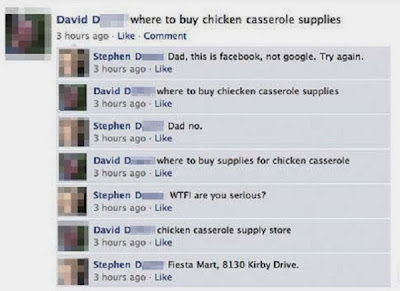
It kind of makes you wonder how his Dad ever figured out how to log into Facebook in the first place. If Stephen didn't finally give him the address they could have been at it all night!

Pregnancy Scare
Why Avoid Getting Friends With Your Parents on Facebook

I predict this girl is going to give her Dad a heart attack one day...

Racist Dad
Why Avoid Getting Friends With Your Parents on Facebook

You somehow get the impression he wouldn't have been nearly as upset if the guy had been white. Thanks for announcing to all my friends that you're a racist, Dad!

Mom Burn
Why Avoid Getting Friends With Your Parents on Facebook
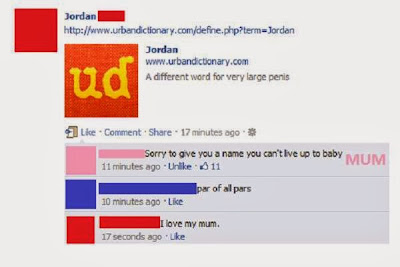
I think Jordan might need some ice for that monster burn his Mom just gave him!

Divorce Announcement
Why Avoid Getting Friends With Your Parents on Facebook
It seems like this announcement could have been done in private first. Even older people are beginning to rely a little too much on social media these days!

Worst Father Ever
Why Avoid Getting Friends With Your Parents on Facebook
I don't know what is worse, that he is talking about his daughter's butt or that he is talking about his daughter's butt before he even picked her up at the hospital!

50 Shades of Yuck
Why Avoid Getting Friends With Your Parents on Facebook
No Mum, I do not want to discuss bondage sex with you!

Mom Found It
Why Avoid Getting Friends With Your Parents on Facebook

No one is better qualified to embarass you more than good old Mom.

List of Most Popular Games on Facebook in 2013

In addition to social media, Facebook also has gaming features that can make people addicted. Not surprisingly, the creation of Mark Zuckerberg has finally released the list of the most popular games throughout the year 2013.

Games included in this list are selected based on an assessment of the associated implementation users on Facebook and a growing number of gamers and overall game quality. In addition, for the category of favorite staff consists of some of the popular games on Facebook's office.

Criminal Case, Most Popular Games on Facebook in 2013

In the list, the game earned a "Game of the Year 2013" is a Criminal Case, which utilizes Facebook Open Graph API. The following is a complete list of the most popular names that exist on Facebook:

Latest Game Category :

1. Bake Shop Drop by Broken Bulb Studios [Match-3 game]
2. Farm Heroes Saga by King [Match-3 game]
3. Heart of Vegas by Product Madness/Aristocrat [Slots game]
4. Hit It Rich Casino Slots by Zynga [Slots game]
5. Jelly Splash by Wooga [Match-3 game]
6. Kitchen Scramble by Disney Interactive [Strategy/time management game]
7. Monster Legends by Social Point [Monster battles game]
8. The Smurfs & Co.: Spellbound by Ubisoft [Strategy/village building game]
9. Soldiers Inc. by Plarium [RTS game]
10. Solitaire Tales by Qublix [Cards game]
11. Thunder Run War of Clans by SpinPunch Games [RTS game]
12. Vikings Gone Wild by EveryDayiPlay [RTS game]

Facebook Staff Favorites Category :

1. DoubleU Casino by AFewGoodSoft [Cards game]
2. Game of Thrones Ascent by Disruptor Beam [RPG/simulation game]
3. King's Bounty: Legions by Nival [Turn-based strategy game]
4. Panda Jam by SGN [Matching game]
5. Wartune by 7Road/Proficient City [MMORPG]
6. War Commander by Kixeye [RTS game]

Next game that has the title of "Hall of Fame" or games that have been present before 2013, but remained popular in 2013 are as follows:

1. Candy Crush Saga by King [Match-3 game]
2. DoubleDown Casino by DoubleDown Interactive/IGT [Cards game]
3. FarmVille 2 by Zynga [Farm simulation game]
4. Slotomania by Playtika/Caesar’s Interactive [Slots game]

Facebook itself has started a trend showing games for users on the site since 2012. Now this year the list of games on the site have been included and users who have not tried these games can use these lists to spend free time.

Develop Instagram, Facebook Appoints New Director

Facebook seems not too comfortable with the progress being made by Instagram to date. The proof, Facebook has just sent one of its flagship developer to develop media-sharing applications that acquired the last April 2012. It is mentioned as an effort to "build a few things to make it better".

According to news released by TechCrunch on Wednesday (08.14.13), Facebook pointed to Peter Deng served as Director of Product at Instagram. But on one occasion, Deng asserted that he did not want to make a significant change in body Instagram. Deng just want to be a supporter of Kevin Systrom and Mike Krieger.

Develop Instagram, Facebook Appoints New Director

"I did not come to change things," said the creator of Facebook Chat, Groups, and Facebook Messenger in the last six years of his career. "Kevin and Mike have made things better. Now, how we can go faster and build a variety of products that are more beautiful? That was my goal coming. "

Now, Instagram has been prepared to actually go ahead and compete with the developers of media-sharing applications. After the previous successful release of Instagram Video that can be called as one of the main challengers Vine, Instagram has now started targeting the other market share. Deng is credited background makes various products for Facebook, Instagram seems to be very profitable in the future.

Swarm.fm Apps Sync Facebook and Sportify for Your Fave Music

Swarm.fm is a unique application that sync Facebook and Sportify for you to search favorite music recommendations.

Swarm.fm is a new app for music streaming service Spotify. The app won first prize at Spotify’s Music Apps Hack Weekend back in February, and has now been integrated into the Spotify software. Swarm.fm is the brain-child of Peter Watts, the same developer responsible for +Music, a music extension for Facebook. +Music was the primary method of listening to music on Facebook, before the social networking site partnered with other services, including Spotify.

Speaking at the hacking event earlier this year, Watts explained:

“Swarm augments your music collection with activity from your friends (liking bands, listening, posting songs) and activity from artists you like (new releases, status updates), to keep you up to date with your ‘music universe.’ It also find similarities between friends and can generate playlists based on artists, interests and brands you have in common.”

Swarm.fm Apps Sync Facebook and Sportify for Your Fave Music

Once installed, Swarm.fm runs inside Spotify. When on screen, you can open up information about any of the artists in your Spotify library. Available information includes which individual tracks you have, the artist’s discography, and which of their tracks are available to stream through Spotify. You can also read a biography, and connect with Facebook to find out which of your friends have been listening to the same artist.

So far, so good. One of Swarm.fm’s reigning features, however, is its ability to direct you to new music based on what you’re already listening. It does this in two different ways: by genre, and by similar artists.

Swarm.fm Apps Sync Facebook and Sportify for Your Fave Music

When you view an artist’s biography, you can see which genres they are “tagged” with. Clicking on these tags takes you to a list of artists who share the same tag. There, you can view artists by similarity, popularity, and ‘trending’ (i.e. emerging artists). You can also view other artists in your collection that match this tag.

Clicking on the “Similar” tab in the artist’s profile page brings up a list of similar artists that you might enjoy.

Swarm.fm Apps Sync Facebook and Sportify for Your Fave Music

Once you’ve connected with Facebook friends, you can find out what they’re listening to through Swarm.fm, even if they don’t have a Spotify or Swarm account themselves. And if you connect to a friend whose music taste turns out to be less than palatable, simply mute them, without having to disconnect.

That’s already quite a lot of features, but Swarm.fm doesn’t stop there. You can also view brand new releases, filtering the results to only include new releases from artists already in your Spotify library, or the most popular. In addition to finding new music, you can use the app to manage your current library. Search for music or artists, display artists of certain genres, or display artists from a certain year.

Swarm.fm Apps Sync Facebook and Sportify for Your Fave Music

Swarm.fm provides a comprehensive service that goes above and beyond what most music managers give. If you’re a regular Spotify user and want to give the music streaming service extra functionality, Swarm.fm is a great way to bring everything together and view your music library, friends’ soundtracks, and new recommendations all in one place.

Find out more about Swarm.fm by viewing the video below :


Make Schedule for Your Facebook Status

Are you a busy person but do not want to miss making status? Can you use a little Facebook automation. The step here.

Many users are cheered up with this feature because Facebook's EdgeRank algorithm made ​​using third-party tools like HootSuite or SocialOomph for scheduling your posts desirable less than manually posting.

Now let's learn more about the advantages of using Facebook scheduled posts. First we will tell you the steps to schedule your status and edit them.

Make Schedule for Your Facebook Status

#1: How to Schedule Your Posts Scheduling is easy—just follow these steps:
  • Write your post as you normally would. You can attach photos, add links, add YouTube videos, add tags to other pages and events or just include regular text.Make Schedule for Your Facebook Status
  • Type your post as you would normally.
  • In the lower-left corner of your post, click on the clock symbol as shown in the screenshot above. You can now add the year, month, day and time you want the post to go out.
    Make Schedule for Your Facebook Status
    Add the date and time you want your post go out.
Notice that you can also backdate your posts to supplement your Timeline if you wish (more on that later).
You can schedule your post up to 6 months in the future (more months are shown, but if you select more than 6 months out, Facebook won’t accept it). You can schedule the minutes at 00-, 10-, 20-, 30-, 40- or 50-minute marks of the hour. So if you need a post to go out specifically at 2:15 pm, you cannot set it.
  • You can also add language and location targeting in your scheduled posts, just like you can in your regular posts. Just click on the Public icon and make the necessary adjustments.
  • Once you have everything set, just click the blue Schedule button. Voilà! Now just remember to circle back to your posts later after the scheduled time to watch for follow-up comments!

#2: How to Find and Edit Your Scheduled Posts

To see what you have scheduled and make any changes, just go to your activity log by accessing the admin panel at the top of your page (if you don’t see the admin panel, click the red admin panel button in the upper-right corner), then click Edit Page, and Activity Log. You then see all of your scheduled posts.


Make Schedule for Your Facebook Status
Use the activity log to find your scheduled posts.
Make Schedule for Your Facebook Status
View your scheduled posts.
If you need to edit your scheduled post, the only thing you can change from here is the time, unfortunately. To edit the text, you must cancel the post and redo your scheduling. To cancel or change the time, mouse over the upper-right corner of the post in the activity log.

Make Schedule for Your Facebook Status
You can only change the time or cancel the post and start over.

#3: You Can’t Schedule Everything

You can schedule links, photos, status updates and videos (although I found scheduling a video to be a bit buggy). You can also schedule a YouTube video link, which will attach as it normally does in your posts.

Make Schedule for Your Facebook Status
You can schedule a photo.
You can’t schedule some of the other types of posts as you can normally do from the publisher, such as photo albums, posting of events, questions, offers and milestones.

#4: You Can Backdate Your Posts

You can schedule things in the past. I’m not sure why you would want to use the backdating feature other than to fill out your Timeline a bit. But if you have a significant event that you want to post about in the past, I recommend a milestone post instead.

The interesting thing about backdating is that the post does go out into people’s news feed immediately and then is shown at the appropriate place on your Timeline.

Make Schedule for Your Facebook Status
The backdated post goes out immediately into the news feed with a note about when it was added into the Timeline.

#5: Scheduled Posts Won’t be Automatically Tweeted

If you have linked your Twitter account to your Facebook page by setting up www.Facebook.com/Twitter so that everything you post on Facebook gets tweeted (yes, we know that it’s not always a great idea but sometimes it isn’t terrible), be aware that your scheduled posts won’t go out to Twitter.

So if you rely on your Facebook page to supplement your tweets and you move to more scheduled posts, you will have to schedule your tweets with a different tool.

#6: Scheduling Posts Can Bring about More Engagement

What can you expect when you schedule posts? It depends on your baseline right now with your Facebook page—how often you are posting, how engaged your audience is, what you are posting and other factors.
One thing that scheduling can do for you is allow you to post more regularly and increase your posting without spending all day on your Facebook page.

Randi Thompson of How to Market Your Horse Business (and an active member of our Social Networking Clubs) tried an experiment where she upped the number of posts by using scheduled posts on two of her pages.

On her How to Market Your Horse Business page, she went from posting 3 times a day to posting every 3 hours and 5 times a day. Then she had another page, Horse and Rider Awareness, where she was not posting regularly at all. She tried scheduling 3 quality posts per day. Here are her results over a 5-day period.

Make Schedule for Your Facebook Status
Using Scheduled posts to increase post frequency helped increase engagement.
Now of course this is not a comprehensive study. And this could be done without scheduling posts. But the point is that scheduled posts can make things easier for you so you can batch your work, know that things are being posted at the times you want and you can get on with other parts of your business. I encourage you to try some experiments with scheduled posts on your page and see how things work for you.

And again, make sure you circle back to these posts to follow up on comments!

#7: Scheduled Posts are not Identified or “Punished” in Facebook

When you post from a different scheduling tool such as HootSuite or BufferApp, people can see that you’re posting through a different tool. But Facebook’s scheduled posts are seamless.
Make Schedule for Your Facebook Status
The posting tool appears under the post.
Using a different tool to post to Facebook is not all bad. Sometimes it’s much better to save yourself a little time and get the post out with the tool you’re using rather than not post at all.

But Facebook has been known to show posts using third-party tools a little less in the news feed or collapse them. As of this writing, I believe third-party tools are faring well in Facebook. But we all know how Facebook changes.

#8: Scheduled Posts May be Coming to Personal Profiles

The option does appear to schedule a Facebook post on personal profiles, which may be a good thing for people who are using their personal profiles to talk about business. But as of this writing, I could not schedule anything into the future, only for today or in the past.

Not everyone will see big changes by scheduling posts. You still have to deliver engaging Facebook content. But what scheduled posts can do is free up some of your time by allowing you to batch your social media posts into blocks and give you more time to focus on your business.

What are your thoughts? Have you been using scheduled posts? What results have you seen? Tell us in the comments section below!

Source

Google Plus vs. Facebook – Where things stand

Following the launch of Google+, many social media marketers have started to compare and contrast the benefits of the new social media platform for brand marketing activity with the benefits of Facebook.

Google Plus vs. Facebook – Where things stand

Facebook has long been the social network of choice for the vast majority of brands operating within social media, but Google+ is continuing to grow and brands are starting to take note.

Google+ looks to have around 60 million users so far, a far cry from Facebook’s 800 million+. So clearly Facebook wins when it comes to the size of the network and will for some time.

But what about the feature set? Who wins when we look at what marketers have access to on each network?

I’ve outlined below the most relevant elements of Facebook and Google+ at present, along with a few conclusions as to which social network comes out on top.

1. Advertising

Facebook is currently the only social network of the two that offers advertising, although Google+ is not far away. Official comment from Google is that adverts will be coming to Google+ soon, so although this is a clear win for Facebook at present, the power of Google’s existing advertising platform may tip the balance a little further down the line.

Winner: Facebook, for now.

2. Posting/interactions

Since Google+ is relatively new to the social network scene, Facebook has had much longer to hone its posting elements. Having raised the character limit for posts and added the questions functionality, Facebook is winning this battle at present, but Google+ may have some tricks up its sleeve, particularly when it comes to its hangout functionality.

Winner: Facebook

3. Applications and tools

At present, the only applications and tools that exist on Google+ are games and other browser plug-ins that serve to enhance users’ experience on the network, all of which are developed by third parties. Facebook has established its own developer community and Facebook applications are a common characteristic of the majority of major brand pages, but the developer community is likely to be eager to be given license to create apps for Google+ too.

The real battle here will be one of innovation, so although Facebook wins at present, Google+ may have the scope to provide more innovative application functionality for brands since it is starting from scratch.

Winner: Facebook

4. Video/imagery

One of the most established communities on Google+ is the photography community – millions of images are shared on Google+ each day as a result. Although the use of imagery within posts on Facebook does work well, the Google+ environment is much more focused on video and image content than Facebook’s and this is only expected to grow further in the future.

In addition, the Google+ hangout functionality has been a big hit with brands and celebrities so far and there is lots of scope for brand innovation with this in future.

Winner: Google+

5. Events

Events on Facebook can be a great way of helping an important brand announcement or event gain heightened visibility throught the fan base and Facebook itself. Event responses are one of the engagement elements that create more brand visibility in users’ news feeds, making it an effective mechanic for promotion; Google+ currently has no such functionality, nor has it mentioned any future plans for events, so Facebook wins hands down.

Winner: Facebook

6. Segmentation

Google+’s circles functionality allows brands to place their followers into specific circles and target specific content to those circles. This user-specific targeting is a massive benefit to brands that only want their audience to see the brand content they are interested in.

Facebook allows geo-targeted posts to specific locales and countries, but nothing anywhere near as customisable as Google+ and, as such, Google+ is likely much more effective once its user base has grown a little more.

Winner: Google+

7. Customization possibilities

Facebook pages are not terribly flexible when it comes to customisation, although this could change if Facebook opts to implement its timeline functionality for brands. It’s almost impossible to alter the name of a brand page once it is created and the image strip at the top of Facebook pages is always generated in a random order, making branding exercises in this area limited at best.

In contrast, brand pages on Google+ are almost completely customisable – the name can be changed following the page’s creation, the image strip (or in the case of Google+, the ‘scrapbook’) order can be defined, and all of the links in the “about” section are SEO friendly, again enhancing brand benefit in search. Once brands begin to accumulate more followers in Google+, they may find that the customisation possibilities in Google+ are a huge benefit.

Winner: Google+

Final score:

Facebook 4 (WINNER)

Google+ 3

All in all, both networks clearly have benefits when it comes to brand marketing activity, and most brands and their respective digital PR and social media agencies will opt for the network which fits the brief in terms of what they wish to achieve in social media.

The key will be in what happens in the future – both networks will need to innovate greatly if they are to capture the attention of brands and ensure that they continue to market on their network. Facebook has a huge benefit since it already has an established user base, but the growth of Google+ has been astronomical since its launch.

Either way, this will make a very interesting contest and who knows, maybe they will find a way to co-exist simultaneously. Only time will tell.

5 social network predictions for 2012

Facebook is the power hitter in social networking today, and is likely to drive the most activity and a fair share of the innovation in social networking in 2012. But it's not the only company driving things forward.


That puppy is about to get very, very rich.(Credit: James Martin/CNET)

Here's are five ways social networking is likely to play out in the coming year.

1. Mobile social networking means good news for new social startups
In the U.S., the majority of consumers will soon have smartphones (Neilsen puts the figure at 44% today). Smartphones are about the most important thing to happen to social networking since Harvard sent its acceptance letter to Mark Zuckerberg.

Smartphones know where you are, who your friends are, who's nearby, and soon thanks to NFC, they'll know what you're buying and where. They are the key element of the next, mobile phase is social networking.

Facebook is serious about mobile social networking, but it is not the leader in this space in terms of design or technology. Smaller companies, like Path and Milk (with its first app, Oink) are coming out with new takes on mobile interaction. Square could play in this economy as well. All these services will likely use Facebook's network to put people or businesses or in touch with each other in new ways. More specialized mobile networks (really riders on top of Facebook) will appear next year.

2. Twitter makes big impact with brand marketers
While Twitter's new brand pages won't eat into big advertising or marketing budgets in 2012, the new business-friendly features will make an impact. Twitter is a highly effective platform for spreading brand messages via consumer/fans, and it doesn't take much to create an effective Twitter-based campaign.

While Facebook is still the most important and best social vehicle for marketing, Twitter will matter a lot in 2012 due to its simplicity and effectiveness.

You won't see a Super Bowl ad in 2012 without a Twitter tag on it.

3. Social Networking will tell the tale for the 2012 presidential election
We have seen how social feedback and link-sharing can bomb a presidential campaign: the YouTube and Web reaction to Rick Perry's "Strong" ad. And in 2008 the MoveOn group might have made the critical difference in the Obama campaign.

In 2012, the major political campaigns will be even more dependent on social networks, possibly to the extent that effective social campaigns will be more important than broad-stroke and increasingly expensive TV ads. Certainly, no candidate will be able to succeed without a strong following on each of the major social networks.

4. Google+ remains a critical success but a consumer flop
Google+ has a lot of good features, but it needs much more than that to take on Facebook and Twitter. Even Google's tacit promotion of Google+ on its other services and toolbars won't be enough to make it part of the daily diet of social networks for the hundreds of millions of users that Facebook has in its thrall.

Google+ also doesn't have enough muscle to be a big player as a branding tool, compared to Facebook and Twitter.

Even inside Google, we hear, employees don't use it very much.

So, the prediction? Google won't kill Google+, not after its failures with Orkut, Buzz, and Wave. The company will continue to blend Google+ into its other offerings, in particular GMail, Picasa Web, and its search result pages. But few people in the real world, if any, will switch over from Facebook to Google+.

The smart thing for Google? Buy Pinterest. But this is a predictions story, not an advice column.

5. Facebook and Yelp: Social network IPOs do well
For all the bad-mouthing of the Zynga IPO, it's not doing all that badly. As of this writing, it's down 5% from its offering price, and the stock has only be trading since December 16.

In other words, the stock wasn't priced crazy-high nor crazy-low, and if it doesn't drop much further, its middling out-of-the-gate performance will be unlikely to cool the ardor for social network stock offerings in 2012. Facebook and Zynga are two sides of a coin in the social network business. The one's success fortifies the other.

2012 will be a watershed year for startup IPOs. Facebook is set to go public in 2012, as is Yelp.

Interest in Facebook stock will be high as the company nears its IPO. The fire for this one will be stoked by the press, by politicians holding it up as an example of American technological and economic prowess, and of course by underwriters. From a financial perspective, it's far too early to tell if the IPO itself will be aptly priced. But Facebook's influence is growing, the company is making a lot of money, and a successful IPO will be good news for every social company out there. The forces are lining up to make sure this IPO is incredibly well-orchestrated, and successful in the right ways: that is, it pops when it goes public, but not too much.

Facebook Chat Hack: How To Add Images To Your Convos (PICTURE)

Facebook Chat Hack: How To Add Images To Your Convos (PICTURE) socialnetupdate.blogspot.com
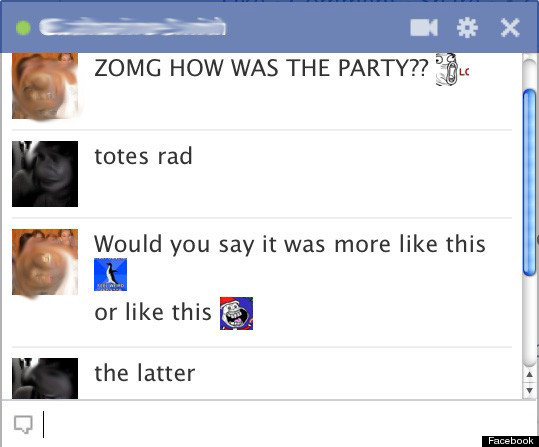
Facebook Chat just got a little bit cooler.
As pointed out by some crafty Redditors, a new, or at least newly discovered, hack allows Facebook users to insert pictures into chats. But you can't insert any picture you want into your Facebook chats using this trick; the hack displays only the main image associated with any Facebook page or profile. (Hat tip to Geekosystem for spotting this.)
Although the pictures show up at about the size of a pea, your friends with perfect vision will certainly appreciate them.
To get this fun add-on in your Facebook Chat windows, you'll need to get the Facebook ID for the profile or page with the picture you want. You can find the Facebook ID for any page by navigating to that profile and looking at the address bar. The Facebook ID is the customized string of numbers or words that appear at the end of the Facebook URL. Copy those numbers or words, add double brackets to each side and press enter. For example, if you wanted to insert a photo of me into a chat, this is what the code would look like [[ramonaroseemerson]]. For people and pages that don't have a customizable ID, the code would look something like this [[55201275]].
In addition to profile photos, there are plenty of Facebook pages and groups with illustrated images that can be used in the same way as profile pictures. Reddit made it easy for users to take their conversations to dark places with its "Rage Face" collection, a primer that includes images like "Me Gusta Face" and "Forever Alone Christmas".
If you're looking for more clever ways to jazz up your Facebook chats, Funny Status Updates lists alternative emoticons for when people are tired of smiley faces. The best ones are thumbs up (163), thumbs down (27) and shark ((^^^)).
If you find yourself getting chatted up by someone you don't really want to talk to, you can confuse them by typing upside down. Anything you type into Flip Text will ʎןןɐɔıʇɐɯoʇnɐ sdıןɟ ɹǝʌo. Then, just copy and paste into the chat window -- or wherever, this goody isn't just for Facebook.
Take a look at what pictures look like in Facebook Chats (below), then check out 31 creative, inspiring Facebook profiles designs.
LOOK:

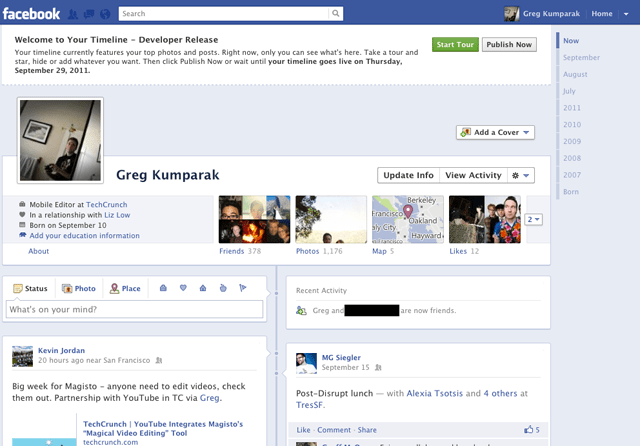
How To Enable Facebook Timeline Right This Second

How To Enable Facebook Timeline Right This Second
[Update 12/15/2011: Facebook Timeline is now available to all Facebook users. Learn more about the global Timeline rollout for web, as well as Timeline for iPhonemobile web and Android. To enable Timeline for your profile, visit http://www.facebook.com/about/timeline]
This morning Facebook announced Timeline, a crazy (and kind of creepy) omnibus look at everything that has ever happened in your Facebook lifespan. It’s like a story book of your life — or at least the online, documented parts.
Facebook said that Timeline would be on the way for everyone sometime in the coming weeks… which is great and all, for everyone else. You’re the type of person who reads TechCrunch, and are thus likely the type of person who likes their new and shiny things right now.
That’s okay. We can make it happen.
Fortunately, enabling Timeline a bit early isn’t too difficult — but it’s not at all straight forward, either.
You see, Facebook is enabling Timeline early for open graph developers. You, too, can be an open graph developer — even if you’re just looking to dabble.
A few things to note:
- You probably don’t want to do this unless you’re actually a developer. Expect bugs.
- Only you will see your timeline at first (unless you decide otherwise), but it will automatically go public after a few days. My timeline was automatically hard-set to go public on September 29th.
- It seems that if you login into Facebook on another machine, Timeline gets disabled automatically on all of your machines. With that said, it seems you can get back to your timeline (but ONLY after following the steps below) by navigating to http://www.facebook.com/YOURUSERNAMEHERE?sk=timeline
- You’ll need to have a “verified” account for one of the steps, which means you need a credit card or phone number attached to the account.

Here’s how to do it:

1. Log into Facebook
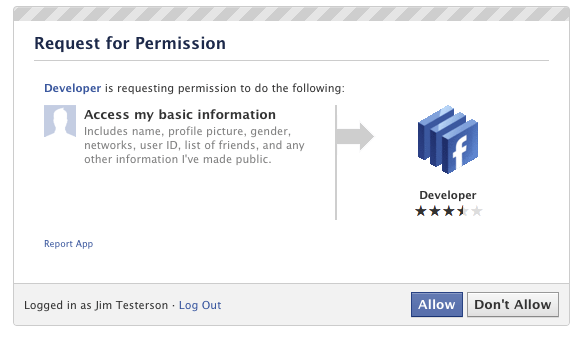
2. Enable developer mode, if you haven’t already. To do this, type “developer” into the Facebook search box, click the first result (it should be an app made by Facebook with a few hundred thousand users), and add the app.
How To Enable Facebook Timeline Right This Second
3. Jump into the developer app (if Facebook doesn’t put you there automatically, it should be in your left-hand tool bar)
4. Create a new app (don’t worry — you wont actually be submitting this for anyone else to see/use). Give your shiny new app any display name and namespace you see fit. Read through and agree to the Platform Privacy agreement. This is the step you need to be verified for.
5. Ensure you’re in your new app’s main settings screen. You should see your app’s name near the top of the page
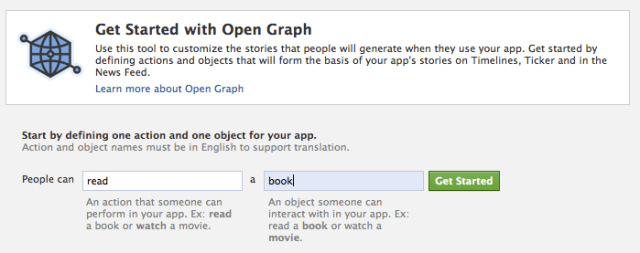
6. Look for the “Open Graph” header, and click the “Get Started using open graph” link.
Create a test action for your app, like “read” a “book”, or “eat” a “sandwich”
How To Enable Facebook Timeline Right This Second
7. This should drop you into an action type configuration page. Change a few of the default settings (I changed the past tense of “read” to “redd” — again, only you can see this unless you try and submit your application to the public directory), and click through all three pages of settings
8. Wait 2-3 minutes
9. Go back to your Facebook homescreen. An invite to try Timeline should be waiting at the top of the page
And you’re done! We’ve seen this work quite a few times now, so it should work without a hitch for just about anyone.

Facebook phone? No thanks


Once again, a Facebook phone is the talk of the tech world, despite Mark Zuckerberg's insistence that his company is not building a smartphone.
Facebook phone? No thanks

This time, the rumors come from All Things Digital, which says HTC is developing a smartphone, code-named "Buffy," with Facebook "integrated at the core of its being." The phone will reportedly be based on Android, and will support HTML5 as a platform for Web apps.
The Facebook phone is always going to be popular grist for the rumor mill because of the forces involved. If the rumors are true, Facebook would be doing battle with three tech titans--Apple, Google and Microsoft--in the always-hot mobile arena. At stake is control over everything we do on our devices--and who we pay for the privilege.
While I relish the drama, I'm a bit frightened by the product, or at least what I perceive it to be.
I'm worried that a Facebook phone would mean more lock-in for consumers. It's already bad enough that when you buy an iPhone or an Android phone, you're pledging allegiance to the App Store or the Android Market, making it harder to switch platforms in the future. With a Facebook phone, you'd be committing to one social infrastructure as well. Your Facebook friends list would become your address book. Facebook Events would become your calendar. Your software would be Facebook apps, all of them designed to share everything with everyone you know.
Call me crazy, but I don't like the idea of giving one company so much control over how we interact with other people online. Inevitably, it leads to abuses of power, such as privacy changes that require users to opt-out. Because once you're deeply plugged into one company's infrastructure, it's not easy to escape.
Unfortunately, efforts to segregate consumers into one social network or another are already well underway. The iPhone has Twitter integration, so you can tweet photos, links and locations to your followers. Android Ice Cream Sandwich asks users to sign up for Google+, setting the stage for more integration in the future. Windows Phones have Facebook and Twitter functions built-in, to the exclusion of Google+. Increasingly, when you buy an iPhone, Android phone or Windows phone, you're also pledging allegiance to Twitter, Google+ or Facebook.
A proper Facebook phone would kick this trend into overdrive, threatening choice with even more lock-in. Although social network integration is great for consumers, the segregation most certainly is not. Responding to All Things Digital, an unnamed Facebook spokesman said that "every mobile device is better if it is deeply social." I agree, just not on Facebook's terms.

Social Networking for Dummies

Social networking is not a new phenomenon. Some people reading this probably already have a Hi5 account, or even playing in Faceparty before they realize it is a dating site. However, social networking really took off with Bebo. We were all giddy with excitement from making quizzes for our friends and adding glittery effects to our pictures. Eventually though, Bebo got so bloated with tackiness that it all had to end. Consequently, once we finished school, we graduated to Facebook.

Facebook has solved the problem of Playboy layouts by not allowing any personalisation of the layout and adopting a totalitarian approach to its users. Since we can longer take out frustration on someone’s disgusting profile, we’ve turned on each other. Facebook has stuffed our social network into one easy-to-read wall.
Nevertheless, while Facebook has mimicked our lives, the users have sadly not mimicked the fine tunings of social etiquette. Perfectly lovely people become social pariahs on Facebook through actions that are completely normal to them, but which threatens onlookers’ entire faith in the human race.

The main offender is ‘liking’. It started out as a way for people to share a common interest, such as abseiling. Yet it has now turned into a monster, throwing up nostalgia from the nineties, secondary school, or even just a million different variations of a popular song. The worst offenders are the 21,245 people who liked ‘Fuck do Honda Civic tá mé capall taobh amuigh’, which for any non-Gaeilgeoiri means that they are in fact a horse outside.

Photos used to be confined to mantelpieces and albums, but are now sadly out there for the whole world to see. We all fear that one friend who always brings a camera on a night out, takes 300 photos and without any editing at all, proceeds to tag every single person. So, while you’re still in bed hungover, the whole world can see you shifting the first year with the gammy eye.

Facebook comments are the cornerstone of interaction on the site – great for having the banter with your friends, until some casual acquaintance joins in and party’s over. While some people are serial likers, others are serial commenters, butting in on everyone’s conversation. A commenter and a liker are often one in the same, as they like every mildly funny wall post, while also commenting on how funny it was.

While I have pointed out the problems of Facebook social etiquette, you might notice I have failed to offer any solutions. Why? Because instead of solving the problem, I’d rather just sit back and watch Facebook self-destruct owing to the creation of one too many groups about how UCD is better than Trinity.

Facebook beats Orkut in India

Orkut, the social networking site of Google is popular in India and Brazil only. Now Orkut lost its domination in India also. As per the report of Comscore-(A leading web market analyzing company). With 20.9 million visitors Facebook snatched the number one social network position from Orkut in India. Facebook achieved this position with 179% increase of traffic within one year. It is a great achievement for Facebook because now India ranks the seventh largest market worldwide for social networking, after the U.S., China, Germany, Russian Federation, Brazil and the U.K.  Growing broadband penetration and 3G syndrome can skyrocket the figures shortly.
Flexible website integration options and the concept of Fan pages make Facebook the favorite of webmasters. One of the main complaints against Orkut is its amateur look. Understanding the same, Orkut has done some recent polishes but which couldn’t create a buzz across social network world. Orkut changed Scrap settings also to improve privacy and security.
Addictive Games like FarmVille and a huge collection of applications significantly contributed the Facebook escalation. It is interesting to see that with this facebook application you can bring your Orkut profile within Facebook, means can share your Orkut Profile, Photos, Scraps with your Facebook friends! You need not to provide the Orkut login id or password. Simple Orkut profile URL is sufficient.

Everybody hates Facebook

Facebook is far and away the most successful social website on the Internet. It sprang from humble origins: Some smart Harvard kids had the idea of digitizing their college “facebook,’’ the slender student photo catalog primarily used for scoping out attractive members of the opposite s*x. MySpace had already commercialized the idea of Internet “friendship,’’ but Facebook proved to be better, faster, cooler, and so on.

Facebook now has hundreds of millions of users, including me, who don’t really do much of anything. We post pictures of families or vacations; we link to interesting articles or dopey videos. (The recent, not-safe-for-work-or-for-the-family-newspaper homage to Internet-hating author Ray Bradbury is an instant classic.) We make inane comments like, “Thinking.’’ Writers hilariously detail their various blocks and obsessions for the world to see.

In return for hosting our trifles on the Web, Facebook shows us a few ads on the right-hand side of the screen, which are easy to ignore. Because I am a member of several online Republican “communities,’’ Mitt Romney keeps trying to sign me up for something. The Mormon Tabernacle Choir? I have no idea. I don’t pay much attention.

It is all pretty innocent. Or is it? There is an active industry in Facebook-hating, generally equating the California-based company with Big Brother, various spy agencies, and worse. “Facebook is the gutter,’’ is a typical posting from Leif Harmsen, a Toronto-based artist who merchandises “Shut Your Facebook’’ T-shirts from his website.

Apropos, one of the most active Internet sites for Facebook-hating is Facebook itself. FB’s own “I Hate Facebook’’ page has 6,300 supporters. There is a nascent Community Page, “Hating Facebook,’’ with 670 fans. At least someone has a sense of humor, and it’s not Facebook’s many critics, that’s for sure.

Every few months or so, Facebook institutes a procedural change that drives everyone nuts. One sentence in an early privacy policy, for instance, read: “We may share your information with third parties, including responsible companies with which we have a relationship.’’ Cue predictable outcry, cue FB backing away from unpopular policy. Likewise, one’s “profile,’’ which contains personal information, used to show up in Internet searches. Supposedly, it no longer does.

Late last year, Facebook ignited yet another privacy firestorm, incurring the wrath of the American Civil Liberties Union, the Canadian government, and others. This one involved whether or not the world could find out who your “friends’’ are. (Facebook friends differ from actual friends, but the distinction is a subtle one.) A couple of weeks ago, Facebook launched a “Places’’ function, which tells the world that you are eating at a specific restaurant or ogling art at a specific museum, and may identify FB friends there with you. Facebook dodged the usual tsunami of online hate by consulting privacy experts before launching Places, and by making it optional.

But really — privacy? If you attend parties where idiots brandish their cellphones to photograph whatever it is people do at parties, you’ve diminished your expectation of privacy by about 500 percent. You’re so protective of the fascinating details of your financial life, yet you hand your credit card over to the high school dropout at the gas station. But you don’t trust Exeter- and Harvard-educated Mark Zuckerberg, the current CEO of Facebook?

People are very vain about their personal information. But as a recent Wall Street Journal series, “Your Privacy Online,’’ revealed, yes, Google and Microsoft are leeching lots of information about you from their software, but they have little interest in who you are. They care what you are: an SUV owner; a Sheraton rewards club member; a Red Sox fan. They sell advertising to marketing categories, not to clumps of Social Security numbers.

There is always talk of an alternative to Facebook. Google, which rules the world, might be able to create an instant “community’’ of hundreds of millions of users from its successful Gmail accounts. Earlier this year, the Facebook-killing flavor of the month was a start-up called Diaspora, which would be an open-source Facebook without the corporate controls emanating from FB HQ. They were supposed to have a product around now. They didn’t answer my e-mailed inquiry about their plans.