5 Ways Social Media Can Ruin Your Reputation

5 Ways Social Media Can Ruin Your Reputation

Social media sites like Facebook, Twitter and Google+ allow us to connect with the players in our market. But, when used improperly, social media can be a dangerous platform for entrepreneurs to ruin their reputations.

Here are five ways social media users can destroy their online rep, and tips for steering clear of these costly mistakes:

1. Boring posts. A boring post is anything that lacks your unique personality or perspective. Giving a fresh perspective on an old topic or going against the status quo is what gets noticed.

So ask yourself how you can infuse your own character or sense of humor within each post. This is the essence of branding. The last thing you want to be is forgettable.

2. Disrespecting others. Social media is not the place to work out your problems with people. It's no different than yelling insults at someone in public or raising your voice at a retail store employee. Yes it gets peoples' attention, but that's not the kind of attention you want.

Unfortunately, the higher you climb in social media, the more people will want to throw stones at you. But don't retaliate publicly. Simply delete the negative comment, block the person and then decide if you want to address the issue privately, or just move on.

3. Failing to promote others. When it comes to building your business and developing a powerful network, you'll want to develop a reputation as someone who highlights others. Not only does this give credit where credit is due, it also communicates that you're secure with your success and have the ability to promote others in your industry.

Some effective ways to highlight others:
  • When someone gives you a great piece of advice, post it on Facebook or Twitter and tag that person.
  • Utilize the Endorsements feature on LinkedIn and begin endorsing people within your network.

4. Not replying to comments. Not replying to comments on your blog or over social media is no different than starting a conversation with someone and then ignoring their response. Actively monitoring comments and questions on every post can be time consuming, but even posting one follow-up comment per post can show you care and that you're engaged.

5. Being tagged in questionable photos. Most everyone has been captured in a photo that should be titled, "This is not how it looks." As funny as some photos can be, think twice about allowing yourself to be tagged in questionable photos. As a business owner, be mindful of how you want to be perceived publicly. Untag or delete yourself from any inappropriate photos.

Your best ally in creating an image that attracts the right kind of people and attention is to simply use common sense, which usually not so common. As long as you're consistently infusing your unique style and communicating with the same class that you would in public, you'll do just fine.
 .

Measure Social Media Marketing Using Google Analytics

Measure Social Media Marketing Using Google Analytics

With 57% of adults in the UK having joined a social network, online companies have begun to capitalise on this, realising the importance of social media as a marketing tool. As more and more firms set up their company pages, it is not enough to simply have a social media presence; instead, these profiles must be maintained and monitored on a regular basis. This in itself has become a subject of much discussion, with many highlighting the difficulties of measuring the success of this approach. One way around the problem is through the use of Google Analytics. As one of the most treasured applications throughout the online marketing world, Google Analytics provides helpful statistics that can also be used for social media platforms. Here’s how:
  • One of the most obvious, but also most useful, ways Google Analytics can help drive forward your campaign is through traffic data. Through the Social Sources page it is possible to see quickly and clearly how many visitors are being driven towards your site from which networks. Based on this information, you can then make decisions on which sites to focus your efforts on, and which to abandon.
  • It may even be worth delving into this further. Using this same tool, you can also discover which of your individual pages are best promoted by which network. For example, Facebook may be particularly effective for bringing visitors to your product pages, whilst Twitter may be more beneficial for directing traffic to your home page. These facts will help you decide which links to include within which platform, making your social media marketing campaign more effective as well as saving you time in the long run.
  • The conversions report is another key area of Google analytics which should not be overlooked. This allows you to actually establish if your social media campaign is achieving the goals it was set up to reach. To get the best results here, it is best to set up a set of aims as early on as possible. These aims do not have to be sales or leads, but can be smaller or more customised achievements, such as filling out a form, or subscribing to a newsletter. This is ultimately the most effective way to see how your strategy is working and make alterations as and when needed.
Using Google Analytics is a vital step in moving away from more basic and superficial ways of gauging social media success, such as your number of likes and followers, towards a much more relevant way of assessing its worth, and should be considered by anyone setting up a digital marketing campaign.

SEO Positive offer bespoke SEO, PPC account managing , social media marketing and website design services.


5 Simple Things to Improve your Social Media (while eating pie)

Instagram

You can accomplish a lot in an hour. Allow me to make a few suggestions.

•Bake a pie
•Watch an episode of 'Grey's Anatomy'
•Do 5 simple yet important things to improve your social media (while eating pie).

That last one seems like it would take a lot longer than an hour, but most of the apprehension over digging into social media comes from the belief that you don't have time for it. You do.

Here are 5 things you can do now to make social media more useful and enjoyable to you and your followers.

FACEBOOK: Create or subscribe to an interest list.

Think of an interest list as a shareable personalized news feed with content pertaining to a specific subject or group of subjects, one you can control whenever and however you want. Your regular news feed is jammed full of stuff your friends are doing and sometimes it's TMI. Interest lists allow you to choose a topic — say news — and subscribe to the pages or people you care about most.

It takes about 60 seconds to create a list, but if you are short on time, just type in a topic, hit subscribe and you're done. To get started, go to the main Facebook page (not your Timeline) and look toward the bottom of the left rail for the area titled "interests." Interest lists were introduced in March, and it might be Facebook's most overlooked feature.

INSTAGRAM: Upload your first photo or interact with someone.

There's a reason Facebook purchased Instagram for $1 billion: It's popular. If you have an iPhone or Android device, you need to introduce yourself to Instagram. You'll hear people talking about adding filters to photos. That's only part of what Instagram does. The power of the platform lies in the community of people that want to share what they are seeing around them. The first time you follow someone from Japan and they upload a shot of their commute to work, it's pretty awesome. You feel like you're right there.

PINTEREST: Score an invite, pin and be hooked

If this column has any fine print, it's this: It's easy to get started on Pinterest, but once you do it's very addictive. Request an invite at pinterest.com or ask a friend, search for one thing you like and repin it to the board you just created. Then let me know what you think.

GETGLUE: Social media meets TV.

GetGlue is a social network for entertainment — TV shows, movies, books, music and more. So before you watch a show, like "Grey's Anatomy," check in on GetGlue. You can earn stickers, discounts and other rewards. Your whole life is social, and now watching a show alone in your pajamas with a pint of ice cream in your lap is too. You're welcome.

ANY PLATFORM: Check your privacy settings

They aren't really confusing, there are just a lot of them. And because they tend to change often, it's always a good idea to jump in and make sure nothing is awry. Start on Facebook by clicking on that arrow in the upper right corner and selecting privacy settings. What you see might surprise you.

That's it. Those 5 things will expand your social media repertoire, and I promise they won't take up much time at all.

President Obama adds Pinterest to his social networks


How many people know the recipe for President Barack Obama's family chili? Before today, probably not many. But now anyone on the social-networking site Pinterest can find out how many onions, ground beef, and kidney beans the recipe takes, and then pin it to their own profile if they like.

Obama has added the popular virtual pinboard site Pinterest to his social-networking trove and today his filled-out profile page with eight boards and 44 pins was made public. According to tech news site Mashable, the Obama campaign set up the account a few weeks ago, but there wasn't any activity until today.

Besides a board titled "Obama-inspired recipes," there are boards named "Pet Lovers for Obama" with photos of the presidential dog Bo, "Just the Facts" that explains some of the president's policy points such as health care reform, and a couple photo albums that show Obama on the road and with his family. At the time of this writing, he has 3038 followers and counting.

Obama is a dedicated social-networking buff; in addition to Pinterest, he has accounts with Twitter, Facebook, YouTube, Instagram, Tumblr, Google+, and Myspace. However, as his Pinterest profile says, "This page is run by Obama for America, President Obama's 2012 campaign."

What this means is that the president's social-networking accounts are run by his campaign staffers and once in a while he will pop in with cameo updates. For example, on Obama's Twitter account, his staff regularly tweets on his behalf and anything written by him includes the word "bo."

According to The Washington Post, none of the Republican candidates have signed up for Pinterest yet. However, former Massachusetts Gov. Mitt Romney's wife -- Ann Romney -- did debut her own page last month with seven boards, including "Things I Love," "Patriotic," and "Books Worth Reading."

Social Media And Your Job Search


Some employers are asking potential job candidates to provide login and password information for social network sites. The companies are then scouring the social sites for any information that might affect their hiring decision. Others are simply searching the sites for any information they can access.

Is it legal for a company to ask for your username and password? News 2 discovered it's a gray area.

"Our laws just have not caught up with the technology age. We're still having the court system trying to decide how far we go with the freedom of speech and other types of issues," Attorney Karen McKeithen Schaede said.

Even though we're talking about new technology, old laws still apply. For example, the Civil Rights Act says discriminating based on race, color, religion, s*x or national origin is illegal.

Schaede said, "Employers need to be aware when they're asking for this information, they're also opening themselves up to possible future litigation. They have to be cautious of what they're asking candidates to do."

If you want to be a Winston-Salem or Greensboro Police Officer, investigators will look at your Facebook and Twitter pages.

Assistant Greensboro Police Chief Anita Holder told me officers understand they must give up some of their own rights to protect the rights of others. As part of the application process, the department asks you to log on and scroll through your social networks.

"Because of the background process and the thoroughness of it, they know that we have to check every piece of information that we can. Checking their social sites is sort of the equivalent of things we would have done twenty years ago by calling friends and neighbors," Holder said.

Colleges and Universities are also monitoring social networks. At UNCG, some coaches require players to "friend" them on Facebook. The level of monitoring depends on the coach and sport.

News 2 asked Schaede what you can do to protect yourself. She said, "Don't post anything online that wouldn't feel comfortable seeing in court."

How to Use Social Networks for Rankings in a Roundabout Way

http://socialnetupdate.blogspot.com/2012/02/how-to-use-social-networks-for-rankings.html

Social media optimization is never straightforward. That’s the whole point. You are trying to get your core audience to do your ranking work for you – rather than paying link farms to stuff your site full of inbound links from heaven knows where, you get genuine, solid referrals from actual humans, plus loads of chatter in the social media streams.

The rules haven’t changed – the more content you have out there the more you get indexed; and the more you get indexed the more frequently you hit those coveted top spots. No, it’s the method by which we get there that has altered so drastically. So here’s my short crib guide to getting ahead in social networking:

1: Who Let the Blogs Out?

Blogging is the core content in social media streams. A blog is where you get to express yourself, provide links of your own to other interesting content and deliver information that enhances your customer’s experience of the products you sell and the services you provide. Tweets are great for analysis but unless they go viral they aren’t so great for raising your profile in the right social spheres.

The key thing to remember about blogging is this: people don’t really like it when companies or corporations blog at them. For a while there, we were all convinced that simply entering the blogosphere as “OurCompany” and spamming everyone with a load of corporate sales messages would be good enough. And we found out that it wasn’t.

Quite right too. If we’re going to work the social circles to get more exposure for our brands, let’s at least realize that we have some proper work to do before we get our rewards. The social stream is not like the internet we used to know. It requires genuine engagement, action, reaction and interaction. Otherwise we fail.

2: Give it Away Now

Businesses have to learn to give stuff away for free if they want to get ahead in the social media universe. The internet is all about free stuff – so if you’re not prepared to toe the line then be prepared to get out of the kitchen. Give away resources, links, mentions of other people and thanks to members of your social circle. The more generous you are with other people’s reputations, the better you will be received. An example: I have recently been blogging on behalf of a building company that got such glowing mentions for its work in the social stream of a heated skirting board manufacturer, that it switched all of its supply to the skirting boards in question.

3: Keep an Open Door

Social media is about exclusivity, sure, but it is also about openness. If you are not open to receiving connection from other people in your social circle, then you will rapidly fall out of the picture. You can see this simply by looking at someone’s Facebook activity. A person who uses Facebook every day is bombarded with conversations and links. A person who does not, isn’t – even though they are in the same social circle.

4: Make a Comment Every Day

And that’s a bare minimum. Comments are your calling cards, the things you leave behind to remind everyone else in your social network that you are around. The more positive, relevant and engaging your comments are the better. Do not use comments to plug your brand or product. Someone else’s conversation is their own. You comment to support them and add something valuable to the discourse. Plugging yourself in someone else’s conversation or in a comment is like responding to an update that your best friend is getting married, by inviting everyone to your birthday party. Unforgivable, in other words – and be advised, the social media stream doesn’t forget half as easily as your best friend.

Social media is a whole new world for rankings. You need to unlearn half of what you know and keep hold of the rest – but use it in a different fashion. At least it’s intuitive! And if you do it regularly and well, it is extremely fruitful.

Top 2012 Social Media Resolutions: Share Less, With Fewer People

Did 2011 mark the high point of oversharing? That seems to be the lesson behind a couple of studies that examined the New Year’s resolutions of social media users.

Top 2012 Social Media Resolutions: Share Less, With Fewer People

Most of us, it seems, did make social media resolutions of some sort. In a Harris Interactive survey of 2,000 Americans who use services such as Facebook and Twitter, 63% of respondents said they had made promises to themselves regarding their use of such services in 2012. The survey was commissioned by social network Posterous.

Surprisingly few of those resolutions had anything to do with spending less time on those services. Only a quarter of respondents with a social media resolution checked the box marked “take a break from social media and spend more time interacting with people in real life.” Rather, most users wanted to better control how much they share, and with whom.

The top two promises, chosen by 44% and 42% of resolution-makers respectively, were “share only with close friends and family” and “be more careful about what I share.”

The desire for less sharing was evident on the incoming side, too. The third most popular resolution, shared by 37% of respondents: “Only read status updates from people who are close friends and family.”

Sharing less on social media may not be the most popular New Year’s resolution overall — it’s hard to beat mainstays like “lose weight” or “save more money.” But a separate study, an analysis of more than 152,000 tweets about New Years’ resolutions by Crimson Hexagon, suggests that the social media diet resolution has reached the top tier.

Leaving aside the 20% of tweets that simply said New Year’s resolutions were “lame,” the resolution to “share less on social media” was the third most popular — beating “be kinder to others.”

It’s easy to surmise that we all shared too much last year — that one too many drunken photo got posted, or that an ill-considered joke on your Facebook wall led to a dicey conversation with the boss. But perhaps there’s another lesson to be drawn here: that we’re hungry for a more meaningful, more intimate form of social media.

Most users know the feeling: that Twitter’s connections are too impersonal, that the majority of our Facebook friends are one-time acquaintances we’d rather not spill everything to. On the surface, that’s good news for services like Posterous and Path, which make a virtue of their limited social circles. (It’s also a boon for Google+, which touts its ability to divide your friends into various circles of sharing — though critics complain the Circles feature is still too complex for the average user.)

On the other hand, the resolution to share less — or to only share with family and close friends — doesn’t necessarily suggest we’re ready to give up on the twin behemoths of Twitter and Facebook just yet. After all, “switch my social network” was not a resolution that ranked in the Harris survey. Most of our world is on these big two services, and we recognize that. We would just like to be more careful about what we post there, and to whom.

Did you make a social media resolution for 2012? Let us know what it was in the comments.

Facebook Chat Hack: How To Add Images To Your Convos (PICTURE)

Facebook Chat Hack: How To Add Images To Your Convos (PICTURE) socialnetupdate.blogspot.com
Facebook Chat just got a little bit cooler.
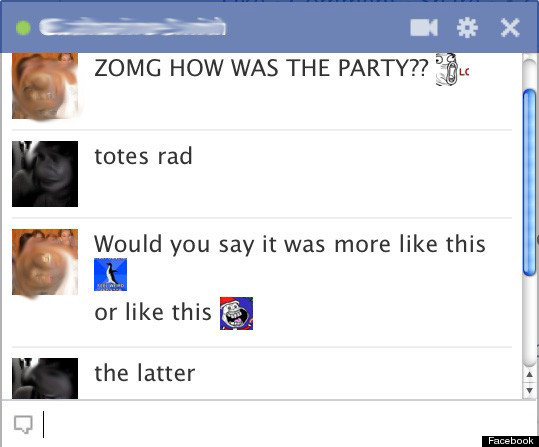
As pointed out by some crafty Redditors, a new, or at least newly discovered, hack allows Facebook users to insert pictures into chats. But you can't insert any picture you want into your Facebook chats using this trick; the hack displays only the main image associated with any Facebook page or profile. (Hat tip to Geekosystem for spotting this.)
Although the pictures show up at about the size of a pea, your friends with perfect vision will certainly appreciate them.
To get this fun add-on in your Facebook Chat windows, you'll need to get the Facebook ID for the profile or page with the picture you want. You can find the Facebook ID for any page by navigating to that profile and looking at the address bar. The Facebook ID is the customized string of numbers or words that appear at the end of the Facebook URL. Copy those numbers or words, add double brackets to each side and press enter. For example, if you wanted to insert a photo of me into a chat, this is what the code would look like [[ramonaroseemerson]]. For people and pages that don't have a customizable ID, the code would look something like this [[55201275]].
In addition to profile photos, there are plenty of Facebook pages and groups with illustrated images that can be used in the same way as profile pictures. Reddit made it easy for users to take their conversations to dark places with its "Rage Face" collection, a primer that includes images like "Me Gusta Face" and "Forever Alone Christmas".
If you're looking for more clever ways to jazz up your Facebook chats, Funny Status Updates lists alternative emoticons for when people are tired of smiley faces. The best ones are thumbs up (163), thumbs down (27) and shark ((^^^)).
If you find yourself getting chatted up by someone you don't really want to talk to, you can confuse them by typing upside down. Anything you type into Flip Text will ʎןןɐɔıʇɐɯoʇnɐ sdıןɟ ɹǝʌo. Then, just copy and paste into the chat window -- or wherever, this goody isn't just for Facebook.
Take a look at what pictures look like in Facebook Chats (below), then check out 31 creative, inspiring Facebook profiles designs.
LOOK:

5 Tips for Journalists to Promote Stories and Engage Readers on Social Media

Social networks are now a major way to promote information online. Posting your articles on social media networks is easy, but it doesn’t guarantee they’ll be shared and ignite discussion.

5 Tips for Journalists to Promote Stories and Engage Readers on Social Media socialnetupdate.blogspot.com

Today, when anyone who has an opinion can write, post, promote and brand themselves – journalists need to step it up. More interested in writing than marketing, journalists often stumble over how to promote their material. Engaging readers can seem tricky, but it’s easier than you think.

Here are my tips:

  • Ask your friends to spark a conversation. Some rules are OK to break. Getting your friends involved is a tactic many people use but don’t often talk about. Remember that people initially come to social networks to communicate, not necessarily read the news. A user will follow your link if he/she sees lots of comments under it, you can make this happen by involving your friends in the discussion.
  • When share your link, give it a catchy headline and brief description. Just like an article becomes more interesting with a good lede, think of your headline as a way to draw people in. Most people do not blindly click on links – they just read the headline and the lede.
  • Choose your audience. Ask yourself who will be reading this article. You might think all of your “friends” (subscribers to your profile on Facebook, for example) will read articles you post. Well, they won’t. Generally, up to 20% of all readers will click on the link and only up to 5% will read the full article. These numbers increase only if your “friends” mesh with your subject matter. When you open an account on a social network to promote your work, make sure you recruit (or at least try to recruit) only your target audience.
  • Social networks permit recruiting people from certain cities or countries and from certain backgrounds. For example, VKontakte.ru, the best-known social network in the Russian-speaking world, has sophisticated filters that allows users to search for members based on similar age, education, political views and so on. In general, don’t just add the people suggested by the social network suggests and don’t add “friends” from lists of your close colleagues since you’ll be “preaching” to those who are already in the know.
  • Expand your reach. Work in other communities. The 15 biggest users in the Belorussian Facebook, for example, have more than 30% of their audience in common. This means that 30% of their audience may already see the same article several times. If you don’t want to recruit unknown people to become “friends,” join communities that might include your target audience and start establishing your presence there via participation in discussions and polls. Once you’re a trusted member of the community, you can start sharing your content.
  • Keep in touch. Add known users to your friend list and communicate with them regularly. Once you’ve established yourself as trustworthy (and this might take awhile) they will be more likely to re-post your links in the future. Such connections will serve as additional channels to spread your news in the future.

How To Enable Facebook Timeline Right This Second

How To Enable Facebook Timeline Right This Second
[Update 12/15/2011: Facebook Timeline is now available to all Facebook users. Learn more about the global Timeline rollout for web, as well as Timeline for iPhonemobile web and Android. To enable Timeline for your profile, visit http://www.facebook.com/about/timeline]
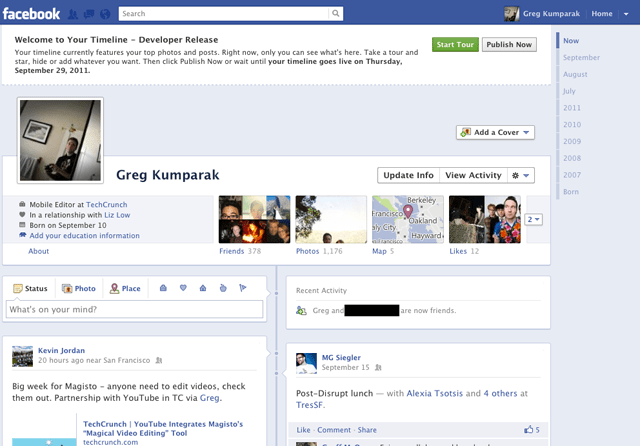
This morning Facebook announced Timeline, a crazy (and kind of creepy) omnibus look at everything that has ever happened in your Facebook lifespan. It’s like a story book of your life — or at least the online, documented parts.
Facebook said that Timeline would be on the way for everyone sometime in the coming weeks… which is great and all, for everyone else. You’re the type of person who reads TechCrunch, and are thus likely the type of person who likes their new and shiny things right now.
That’s okay. We can make it happen.
Fortunately, enabling Timeline a bit early isn’t too difficult — but it’s not at all straight forward, either.
You see, Facebook is enabling Timeline early for open graph developers. You, too, can be an open graph developer — even if you’re just looking to dabble.
A few things to note:
- You probably don’t want to do this unless you’re actually a developer. Expect bugs.
- Only you will see your timeline at first (unless you decide otherwise), but it will automatically go public after a few days. My timeline was automatically hard-set to go public on September 29th.
- It seems that if you login into Facebook on another machine, Timeline gets disabled automatically on all of your machines. With that said, it seems you can get back to your timeline (but ONLY after following the steps below) by navigating to http://www.facebook.com/YOURUSERNAMEHERE?sk=timeline
- You’ll need to have a “verified” account for one of the steps, which means you need a credit card or phone number attached to the account.

Here’s how to do it:

1. Log into Facebook
2. Enable developer mode, if you haven’t already. To do this, type “developer” into the Facebook search box, click the first result (it should be an app made by Facebook with a few hundred thousand users), and add the app.
How To Enable Facebook Timeline Right This Second
3. Jump into the developer app (if Facebook doesn’t put you there automatically, it should be in your left-hand tool bar)
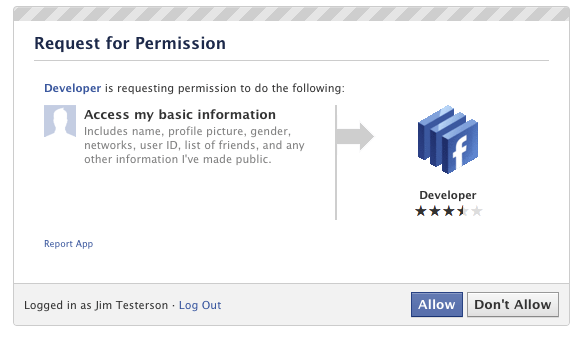
4. Create a new app (don’t worry — you wont actually be submitting this for anyone else to see/use). Give your shiny new app any display name and namespace you see fit. Read through and agree to the Platform Privacy agreement. This is the step you need to be verified for.
5. Ensure you’re in your new app’s main settings screen. You should see your app’s name near the top of the page
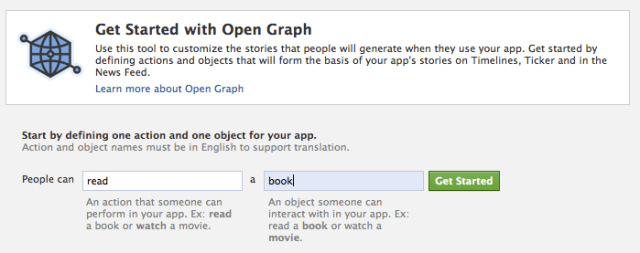
6. Look for the “Open Graph” header, and click the “Get Started using open graph” link.
Create a test action for your app, like “read” a “book”, or “eat” a “sandwich”
How To Enable Facebook Timeline Right This Second
7. This should drop you into an action type configuration page. Change a few of the default settings (I changed the past tense of “read” to “redd” — again, only you can see this unless you try and submit your application to the public directory), and click through all three pages of settings
8. Wait 2-3 minutes
9. Go back to your Facebook homescreen. An invite to try Timeline should be waiting at the top of the page
And you’re done! We’ve seen this work quite a few times now, so it should work without a hitch for just about anyone.

20 Social Media Marketing Do’s & Don’ts

It is no longer a question of IF companies should execute a social media strategy.  The question for most companies is HOW to best execute a meaningful and engaging approach that generates results.  With so many social media marketing options available, marketers must also decide best practices and what tactics to avoid.
We all make mistakes as marketers and it’s important that we not only learn from those mistakes but share  with others so that they can avoid them.  I hope that the 20 Social Media Marketing Do’s and Don’ts that I’ve provided within this article not only entertain you but make you think about your current social media strategy. Which tactics are you happy to say you’ve implemented and which mistakes will you admit to?

20 Social Media Marketing Do’s & Don’ts

10 Social Media Marketing Do’s

#1: Save Time, Re-purpose Content.
While this is a great tactic it is important to be thoughtful about the way that you are re-using content.  Simply spitting out the same information over and over again will not work.  Be sure to change elements of your posts in order to either highlight different information within the post or target a different segment within your audience.

#2: Interaction is Where It’s At!
True interaction via social media can be a tough tactic for many marketers to master.  Finding the correct balance of self promotion and intriguing content that inspires action can be very instrumental in using social media appropriately.  Take some time to comment or interact with your current clients and prospective clients to show that you’re there, and you care about what they are saying.  A simple tactic is to ask questions that inspire a response.

#3: Try Multiple Media Types.
Social media users are interested in fresh new ways of presenting content and ways that they can share it with their networks.  In fact certain forms of media such as infographics or videos have a tendency to be much more sharable and appealing.  Try to incorporate some new media types into your social media content plan for the year.

#4: For Pete’s Sake! Make it Searchable.
I’m going to go out on a limb and assume that you have some sort of optimization in place for your website.  Keep the same strategy in mind for your social media content.  If it can be searched it can be optimized.

#5: Keep Calm in a Crisis
The last thing you need is your social media intern “Sarah” having a meltdown at the first sign of something unfavorable being said about your brand on social media.  By keeping a level head and having an emergency preparedness plan ready should disaster strike you will be able to calmly and rationally tackle the issue.  P.S. Ignoring it doesn’t count as a plan.

#6: Customize the Flow
If you’re like us you have multiple audience members to provide information to online.  This could be different verticals or even different departments within a single organization.  Do your homework,  what sites do your different audience members participate in and what topics are of importance to them?

#7: Don’t Let Just Anyone Represent Your Brand
In the past some companies have encouraged all team members to participate in the promotion of their brands because they worked under the notion that more was better.  False.  While you don’t want to discourage interaction or squash the dreams of your team it is important that the voice of your social media strategy represents who you are and what you believe in as a company.  Trish from accounting that posts on her social network about the copious amounts of alcohol consumed Tuesday night and the terrible time she’s having at work the next day may not be the best resource for networking your company.

#8: What Was the Purpose of This Again?
Remember why you’re using social media in the first place.  By setting a set of realistic and attainable goals you will be able to test what works and what doesn’t and adapt your online marketing strategy from there.

#9: Pull Out the Tool Box and Find Your Measuring Tape
If you create a beautiful piece of furniture but can’t fit it through the front door what was the point?  The same applies to your online strategy.  I don’t want to discourage planning big but make sure that you have an effective means of measuring your success in order to identify the true ROI of your online marketing strategy.

#10: Be Innovative, or at Least Open to Innovation
You don’t have to be cutting edge to run a successful social media program.  However, it doesn’t hurt to have your eyes and ears open to the latest trends.  Experiment with your strategy to find new and interesting ways to present the same information to your networks.

10 Social Media Marketing Don’ts 

#1: Hello? Is Anyone Listening?
One of the worst things that you can do is ignore your audience.  I shared an example last week of ChapStick’s reaction to unfavorable responses from their network.  Deleting information or simply refusing to answer are a big marketing fail.

#2:Have You Ever Tried to Have a Conversation With a Robot?
If you are like me, at one time or another you’ve found yourself screaming at the automated help desk for your credit card company beyond frustrated that you couldn’t speak with a live representative.  Try to spare your online audience of the same exasperation and create thoughtful and conversational content.  Leave the robots for the other guys.

#3: I Know You Are But What Am I?
As we’ve said before it is difficult if not impossible to take things back once you’ve said them online.  There is nothing wrong with disagreeing with audience members, colleagues, or competitors but there is no need to be impolite.  If you take a do unto others approach you will save yourself and your company a lot of damage control.
#4: Accounts Covered in an Inch of Dust.
You did some research and found 10 new social networking platforms that your company is not signed up for.  You assign a task to your marketing team to sign up for these accounts, and unfortunately that is as far as it goes.  If you cannot commit to utilizing a platform on a regular basis and setting it up in a way that clearly represents your brand then what is the point.  Don’t do it just to do it.

#5: One Size Does Not Fit All.
All social media sites are not created equal.  As marketers we must consider not only the type of interaction that typically happens on a given platform but also the audience we are trying to reach with that platform.  If your social strategy for Twitter, Facebook, and LinkedIn are all exactly the same you may want to reconsider your plan.

#6: The Nameless &  Faceless Group from Company XYZ
In order to make friends online you need to be friendly.  Part of being friendly means adding a personal note to your social media profiles.  Snap some impromptu photos around the office and share a little bit about some of the key team members.  This is an instance where a little bit of extra effort can go a long way.

#7: Taking Your Relationship To the Next Step.
Romancing your prospects does not end at gaining them as followers.  Sure they’ve signed up to receive updates on your company but is that really enough?If your ultimate goal is to gain them as new clients then it is important to have a personalized and meaningful flow of communication that sets next steps in the relationship.  An example would be recommending that you have a phone conversation or possibly meet in person to discuss some business opportunities.

#8: We Really Care About You.  Just Kidding.
Spending countless time and effort to engage with prospects only to abandon them is a completely useless tactic.  Handle these relationships with the same care that you would your other business relationships.

#9: We Have No Idea What is Important To You.
Our company is great, we have so much to offer you, hire us now!  I consider each of these to be obnoxious and pitiful tactics for engaging followers.  Instead of utilizing your platform as a means for marketing your products and services try instead to offer information that can help solve the business problem of your prospects.

#10: What Are All of These Followers For Anyways?
Now that you’ve built up this community of online followers what can you use it for?  Your online community is a great resource for crowdsourcing content and brainstorming ideas.  If you want to gather a set of your own statistics why not go to your online community and ask them to participate in a study or survey and share the results with everyone.

Formspring Launching A “Favorites” Directory, Starts Looking Like A Real Social Network

formspring-image001
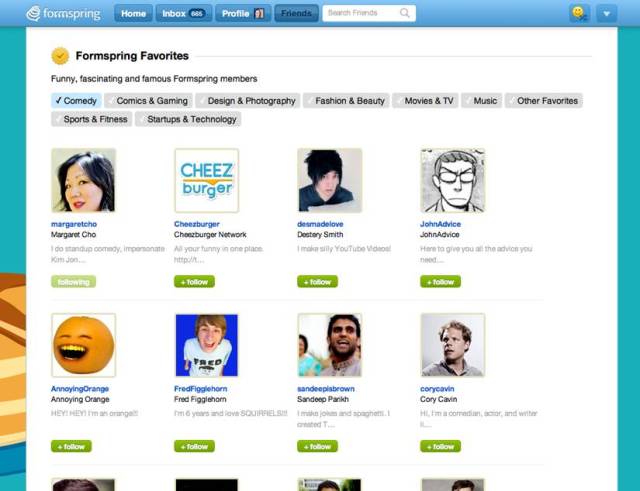
Formspring is launching its first user Directory later today in an effort to better highlight the more popular and famous users of its online social Q&A service. The directory will organize users into categories like Music, Comedy, Sports & Fitness, Fashion & Beauty, Movies & TV, Tech & Start-ups and more.
Current Formspring users will be able to locate the new feature through the “find more friends” section on Formspring when it goes live today, but you can see some of the celebrity users’ pages now, assuming you know their Formspring username. For example, there’s actor Taylor Lautner, producer Jerry Bruckheimer, the bands IncubusWe The Kings, and SOH!3, Marvel Creative Director Tom Brevoort, and pop star Camryn.
At launch, the directory will feature over 100 popular users and more will be added in the weeks ahead. It will also be accessible directly via the URL formspring.me/favorites.
The new feature is meant to compliment the previously launched “Formspring Interests” initiative, which allows users to add up to six interests to their profiles like Music, Sports, Fashion & Beauty, etc. Those “interests” are now mirrored by the categories found within the new Formspring Favorites directory.
The bigger picture here is that Formspring isn’t just launching a directory, it’s taking yet another step on its way to becoming a full-fledged social network. You can see the way the company is carefully and thoughtfully building out links between its users, not only between these new interests and categories, but also through the profile page features “who made you smile” and “who you responded to.”
Formspring’s potential for disruption is that it’s not trying to build another Facebook (cough, Google+,cough), it’s trying to build a network around users’ interests. Of course, do to so, it still has to go up against Facebook’s own interest graph, based on the cumulation of millions of “likes. However, it has one slight advantage: when a Facebook brand page inserts its messaging into your social news feed, it can feel intrusive and annoying. Yet when you venture out to a destination site meant to connect you to brands, celebs, and media personalities, you both expect and desire the same sorts of interactions that may have felt “icky” or bothersome on Facebook. That could be a potential win for Formspring.
Formspring now has 27 million users and sees more than 30 million unique visitors per month. With this new direct access to celeb accounts, it wouldn’t be surprising to see that traffic increase quite a bit in the near future.

7 StumbleUpon tips To Increase Your Blog Traffic

StumbleUpon is a famous discovery engine which helps us to discover new websites in the world wide web. StumbleUpon helps a lot for the newbie bloggers who need more true and regular readers for their blogs. If a new post or page is submitted to StumbleUpon it starts suggesting it to its users who are stumbling in the same niche to which  the article has been submitted from its community of 10 million users .I as a newbie blogger has benefited a lot by StumbleUpon because it has given my blog around 1.4k visitors in a day even when my blog is just 2months old. So I suggest StumbleUpon to every newbie blogger who like to showcase his blog to rest of the world. Now if you have decided to start stumbling then you must know these tips to get even more traffic to your blog.

ww.socialnetupdate.com

First Things First:
The very first thing you need to do is to submit your blog post or page to stumble upon and work on remaining tips and I guarantee that you will get good amount traffic from SU.

Be Active:
StumbleUpon expects you to be an active user in their community to drive traffic to your discoveries. You can be active by discovering websites i.e. stumbling and reviewing the websites by giving thumbs up or thumbs down. It suggests its users your discoveries based on the activity of your StumbleUpon account. So I suggest you to become an active stumbler to get more traffic from StumbleUpon.

Ask For A Thumbs Up:
After submitting your post to SU it first tests by driving a few users to your site and if your post gets thumbs up from some of these users then your content will be suggested to many more. So if you are a newbie blogger you can ask your friends to give some thumbs up for your content in the first days so that your content will be exposed to many others.


Su.pr:
Your account can also be assumed to be active if you use there URL shorten service which provides you with a su.pr short URL. If you share any URL which is shortened using su.pr service then if anyone clicks on it they will be redirected to your page through StumbleUpon domain and even has a StumbleUpon toolbar. Users may easily like your site even if they haven’t installed the SU toolbar.

Follow A Few:
Follow few people in its 10 million user community who belongs to your niche so that you can share your discoveries with them directly to their inbox by sharing it and if they like, your content may get thumbs up which will be an added advantage for you in driving traffic.


Su Badge Helps You:
You can add a stumbleupon badge on your website so that your readers will know about your SU profile and may follow you. Once you have good number of followers belonging to your niche, you can  update them about your posts and can get good reviews.

Buy Youtube Views to be Popular in Youtube

We all have heard and seen those famous Youtube users who have millions of viewers and subscribers. And their videos always have millions of views and many likes and comments. But how did they start? How did they become famous this fast? How can you be like them one day?  The answer is buy outube views.
Youtube community is a big community, with millions of users and millions of videos. In 2010 the total video views has exceeded 1 billion video views per day. This number of views is from real people watching videos, commenting, rating and subscribing to users channels. Some users get a bigger part of the pie more than the others. Famous users get very big portion of this pie.
So how did these famous users become so famous? Their videos aren't super cool and sometimes I feel that their videos are boring. They might be buying Youtube views! Youtube views are what evaluate videos, if your video has many views, and then it will rank higher in search results and will be viewed by more and more people. Many people will prefer to buy youtube views instead of paying so much money as advertisements to get viewers to their videos.
Youtube users can increase Youtube views of their videos by buying the views from a trusted source and enjoy their watching their videos become more and more popular. Users can also buy likes(ratings), comments , and even subscribers to their channels. Actually, users can buy youtube subscribers to get the chance to become a Youtube partner and even make extra and good money.
Users will buy Youtube views to give their videos the initial jump in views to be noticed among the other videos and may even get in first page of Youtube to be watched by many more viewers. To increase youtube views is to get more and more attention to your video and your channel. If you are promoting a product or a new music band that needs to get famous and get more viewers, you can buy youtube views to get more attention and help you become more famous.
If you are promoting a product or a new music band that needs to get famous and get more viewers, you can buy youtube views to get more attention and help you become more famous. Please visit to buy youtube views to know more.

How To Use YouTube Annotations To Maximize Your Subscribers, Views & Overall YouTube Success

YouTube Annotations are one of the most invaluable tools offered by the video site and, interestingly enough, are also one of the most overlooked by online video content creators.  If you aren’t using Annotations in your YouTube videos you are missing out on some great opportunities for maximizing your subscribers, your views, and the overall success of your YouTube videos and channel.  Read on to learn how to use YouTube Annotations to maximize your YouTube success.

Getting To Know YouTube Annotations

Before we get into the different ways you can use YouTube to maximize your subscriptions, views and overall success I want to give a brief overview of how to add annotations to your videos.  After you’ve uploaded a video to YouTube, head over to view the video on its YouTube page and click ‘Edit annotations’ at the top of the page.
Edit Annotations
When you click on ‘Edit Annotations’, you will be directed to the YouTube Annotations Editor.  From this page, you can add all types of annotations, including speech bubbles, notes, spotlights and pause annotations.  Click the icon with the plus sign in the lower left corner of the video to begin adding annotations.  You can then click and drag things around in the time bar below the video to specify when you want your annotations to show, and for how long.
YouTube Annotations Editor
Annotations can be used to add text to your videos to let your viewers know about updates and other information about your video, to create interactive YouTube campaigns and to link to other videos, channels, subscription pages and more on the YouTube site.
Annotations Links

Encourage Viewers To Subscribe With An Annotated Subscribe Button

You can use annotations to encourage viewers to subscribe to your YouTube channel by adding a subscribe button.  You can do this in a couple of different ways.  The first is to make your own subscribe button in a design program and add it to your video where you want it to appear before you export from your editing program and upload to YouTube.  Once your video is uploaded you can add a Spotlight Annotation in the Annotations editor.  Drag the spotlight around the button you created in your video and then click on the link icon.  In the ‘Link Type’ dropdown menu, choose ‘Subscribe’ and enter your YouTube user name.  When users click on your annotated subscribe button they will be directed to a page where they can subscribe to your channel.
If you haven’t incorporated a subscribe video into the design of your video, not to worry!  You can add a Note, Spotlight or Speech Bubble Annotation, type the word ‘Subscribe’ into the text field, and link to the Subscribe page in the same way we illustrated above.  You can check out the video below from Rocket Boom NYC to see how a subscribe button works.  It looks like they created their subscribe button using a Spotlight Annotation with text field.  When you scroll over the rectangular area in the bottom right of the screen you’ll see the word “Subscribe” appear.


Use Annotations To Link To Videos, Playlists, Channels & More

We’ve seen how annotations can help you to increase your subscribers.  However, annotations are also great for increasing the number of views on your videos.  How can you do this?  You can use annotations to link from the video that is playing to other videos on YouTube, to your personal YouTube channel, to playlists you have put together and more.
If you didn’t use annotations to link to other videos that you have created then viewers might just leave the YouTube video page when your video stops playing and move on to the next thing that catches their attention.  However, if you give viewers the option to click and watch your content from within the video itself then you are increasing the likelihood that they will move on to watch another one of your videos.  It’s always a good idea to keep these sorts of links for the end of your video, so that users don’t click away to watch another video before the original one finishes playing.
This week we released an Ultimate Guide To Viral Videos on YouTube and used annotations to tie everything together.  The guide is made up of eight separate video compilations and all are linked together from a menu, which appears at the end of each video clip.  Each of the videos represented in the compilations also link back to the original YouTube clips using annotations.  Check out the Best Pets & Animals video below to see how we used annotations to link our videos together.  The menu at the end begins at 4:14.


Use Annotations To Encourage Feedback

Aside from getting loads of subscribers and video views, you’d probably also like to hear feedback from viewers, whether the feedback comes in the form of a private message, a comment or a video response.  You can plant the seed for viewer feedback using annotations.  There are several ways to do this.
For starters, you will notice that if you click on the ‘Link’ icon when adding an annotation then you have the ability to create links for viewers to click to send you a personal message or to submit a video response.  You can also create a note, speech bubble or spotlight asking viewers a question and inviting them to answer in the comments, or with a simple phrase like, ‘I’d love to hear what you think, leave a comment!’
Many viewers don’t have commenting, video responding, or message sending on their mind when they watch videos on YouTube.  However, if you use annotations to ask them to comment or respond then they will be a lot more likely to do it.

Involve Your Viewers In The Annotation Process

While most video creators choose to create their own annotations and leave it at that, you can also open up the floor to your viewers to make notes and annotations on your videos.  Of course, this isn’t right for everyone but it can be a fun way to get your viewers involved.  With collaborative annotations, your viewers can write messages and place links directly on your video, for a sort of interesting, interactive experience.
To get your friends or viewers involved with collaborative annotations, share the link that is available at the bottom of the YouTube Annotations Editor.  You can also add a “Collaborative Annotations” link from the dropdown member.  However, if you are going to open up the floor to viewers to add annotations then be prepared for a few spammy or mean annotated comments.
Collaborative Annotations
Have you seen any videos on YouTube that utilize annotations really well?  Feel free to share interesting uses of annotations that you have seen in the comments.